

User Onboarding and Managing Agent
Sonata Software Ltd. · HR & Talent
Certification per Microsoft Marketplace.
Evidence tier Source Confirmed · 7 captures on record
What the publisher says
As described on Microsoft Marketplace.
Automate governed user onboarding and access updates in Dynamics 365 with AI-driven request intake, validation, approvals, provisioning and auditability.
Overview
Show the rest of the publisher’s description (59 more lines)
The user onboarding and managing agent helps organizations reduce manual administration effort, improve governance and process user access requests consistently based on predefined rules and approval workflows.
The agent monitors user onboarding and update requests received through email, extracts and validates request details, routes approvals, and provisions or updates users in Microsoft Dynamics 365 Finance and Operations. It is designed for system administrators, support admin managers and IT managers responsible for user access management, onboarding governance and operational support.
Challenges
- Email-based request intake
- Inconsistent data quality
- Manual validation steps
- Fragmented approval handling
- Duplicate or incorrect provisioning
- Limited audit traceability
Key capabilities
- Email monitoring
- Intelligent request extraction
- Request clarification handling
- Microsoft Entra ID user verification
- Request data validation
- Failure notification handling
- Dynamic approval determination
- Workflow-based approval management
- Rejection handling
- User creation and update in Dynamics 365 Finance and Operations
- Profile and attribute updates
- Person and employee mapping
- Security role assignment
- Legal entity assignment
How it works
- Request intake and classificationThe agent receives user requests through a dedicated mailbox, such as iam@company.com, and uses AI Builder to extract structured data from the email. It captures request type and details, extracts user attributes such as roles and legal entities, classifies the request as create or update, and sends an acknowledgment to the requester.
- Prerequisite checks
The validation engine checks mandatory system and identity prerequisites before processing. It verifies whether the user exists in Microsoft Entra ID, validates account status and email or UPN format, and checks role and legal entity mappings.
- Approval workflow
The request is routed through Teams bot-based approval workflows based on request type and sensitivity. Approvals can include manager approval for new or modified users and legal entity owner approval.
- User and access provisioning
Once approved, the agent creates or updates the user in Dynamics 365 Finance and Operations. It assigns or updates security roles, legal entities, and person or employee mapping.
- Notifications and audit logging
The agent sends a completion email with a summary and notifies relevant stakeholders, such as the manager, IT and security teams. Request details, approvals and actions performed are logged, with request details and logs stored in SharePoint. The audit trail captures who, what, when and from where for compliance.
- Exception handling
The agent detects validation or processing errors, notifies the requester with the reason for failure, provides resolution guidance and supports request resubmission.
Business impact
- Faster user provisioning
- Reduced manual effort
- Reduced human errors
- Strong audit and governance
- Controlled access management
- Consistent onboarding process
- Faster request resolution
- Reduced helpdesk dependency
- Policy-driven approvals
- End-to-end visibility
- Handles high request volumes
- Reliable user data in D365
- Reduced process failures
- Better operational insights
Who benefits?
- System administrators
- Support admin managers
- IT managers
- System administrators
- Support admin managers
- IT managers
Sales inquiry: Write to us: partnerupdates@sonata-software.com
Preview
1 image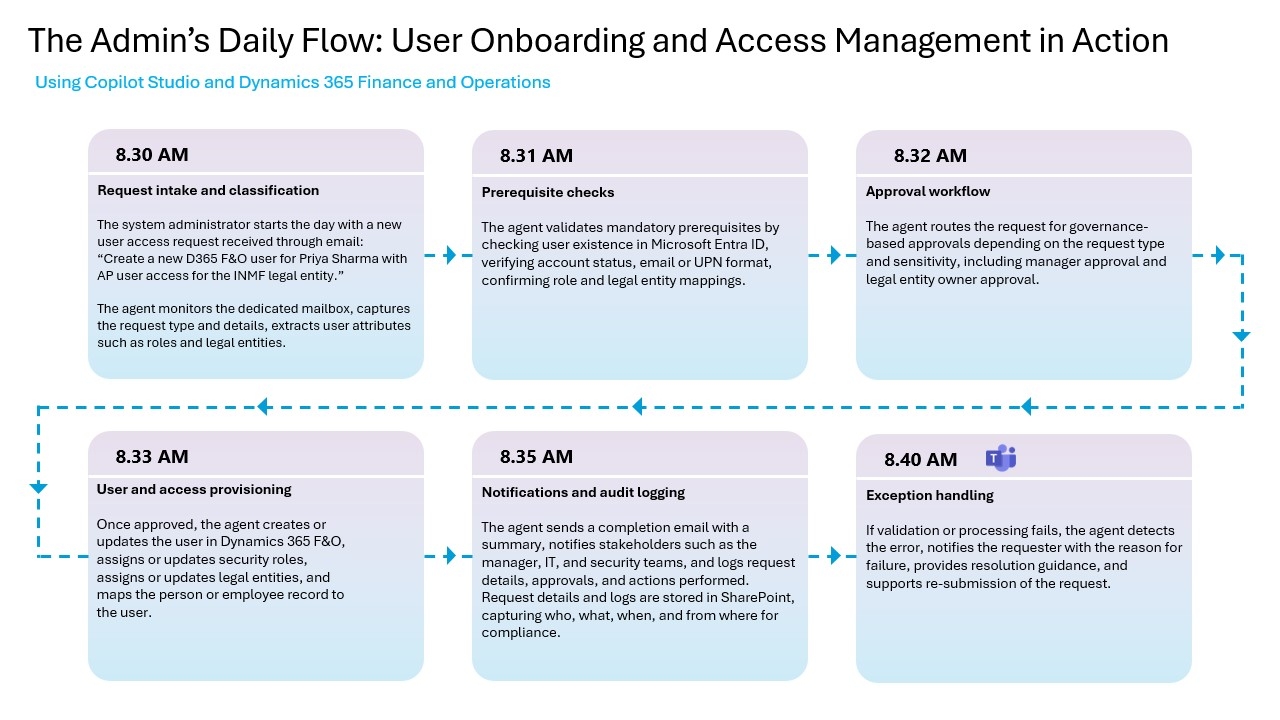
Agent build and provenance
See the full provenance
The layer-by-layer build, the evidence behind each claim, the risk basis and the cross-marketplace links are open to any account. Some rows are disclosed, some the source leaves Unknown; a free account shows you which.
Compliance
- FedRAMPConfirmedNot listed90%, registry-checkedNo FedRAMP Marketplace entry matched this vendor's domain, checked 2026-08-27registry recordas observed 2026-08-27
Confirmed means matched to a public authoritative registry. Claimed means the vendor or its listing states it, not yet cross-checked. A framework not shown was not found in any source we hold, which is not evidence against it. Not listed means a scoped registry check found no match for this vendor's domain: a No is a scoped registry check, not a compliance judgment. Confidence bands: 95% domain-verified, 90% registry-checked, 80% self-attested, 70% weak signal. Self-attested items marked “vendor's site” are gathered from the vendor's own website and are not verified by us.
Vendor
External enrichment · as of 2026-08-29
Sources
Publisher resources
3 linksLinked repositories
Unknown means this listing does not publish a repository. It is not a statement that the code is closed, and a linked repository is not a claim that the publisher wrote it: the registry computes that relationship privately and does not publish it.
Evidence risk is the share of the build you cannot see before you deploy, not a security rating. Sign in to see the layer-by-layer basis for this band.