

SUSE Linux Enterprise Server 16 - Cockpit with AI Security Assistant
Madarson IT · Cybersecurity & IT
Certification per AWS Marketplace.
Evidence tier Source Confirmed · 4 captures on record
What the publisher says
As described on AWS Marketplace.
This is a repackaged software product from Madarson IT with additional charges applied for configuration and seller support.
This AWS-based EC2 instance comes pre-configured with SUSE Linux Enterprise Server 16 and the Cockpit web console -- a browser-based system management interface that lets you monitor, configure, and manage your server without needing to SSH in for every task. Built on top of Cockpit is the Madarson IT Security Assistant, an AI-powered security analysis tool backed by Anthropic Claude that analyzes your live system and delivers actionable security findings, compliance observations, and remediation guidance on demand.
Show the rest of the publisher’s description (23 more lines)
No agents to install. No SaaS subscriptions. No data leaving your instance except to the Anthropic API using your own key. Everything runs on your EC2 instance and is accessible from any browser.
COCKPIT WEB CONSOLE
Cockpit gives you a clean, modern browser interface to manage your SUSE Linux Enterprise Server 16 instance. From the console you can monitor CPU, memory, disk, and network in real time, manage running services, review system and security logs, manage user accounts, configure networking, manage storage and partitions, manage Podman containers, review and apply software updates, and access a full terminal in the browser -- no SSH client required.
AI SECURITY ASSISTANT
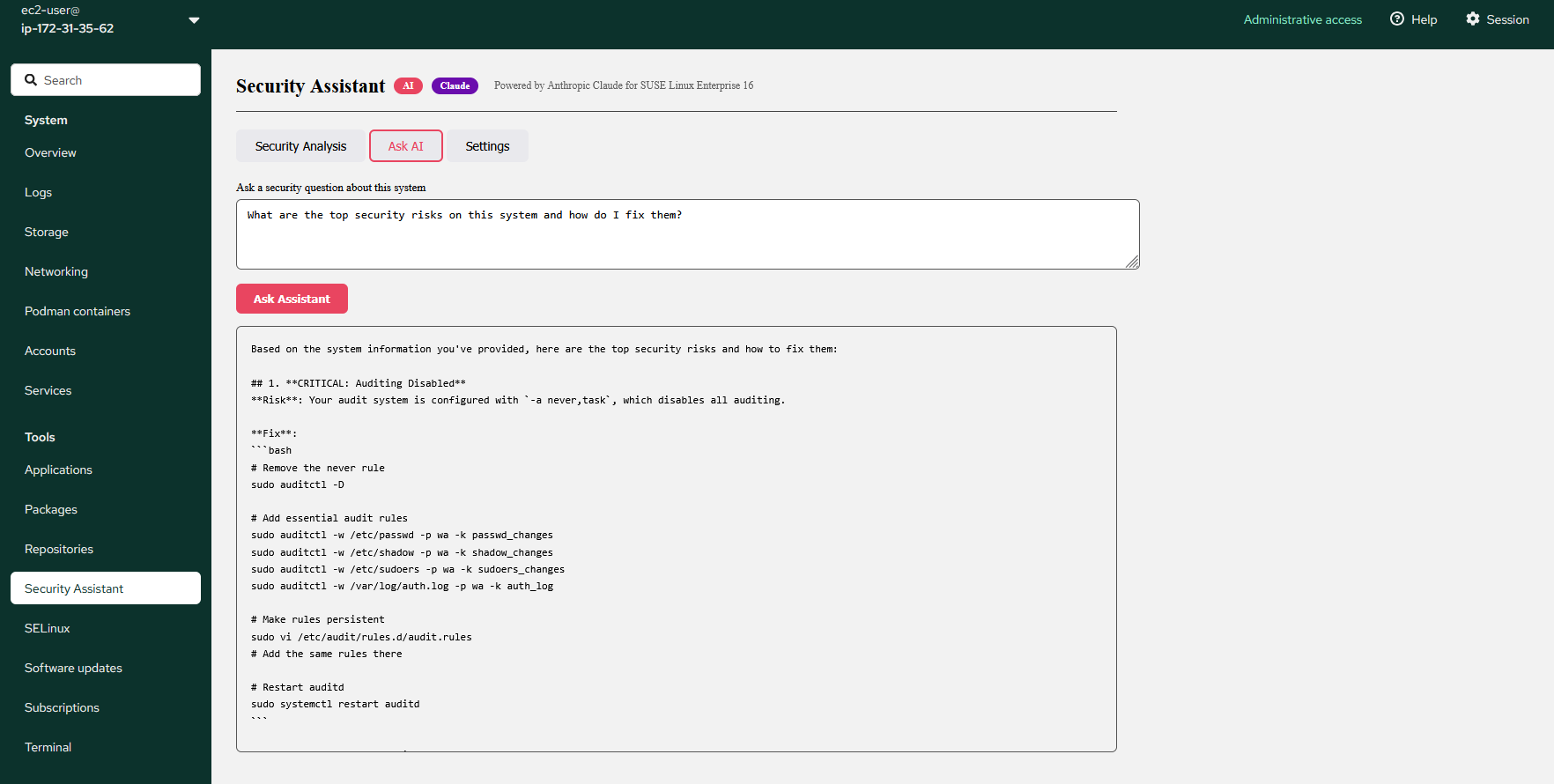
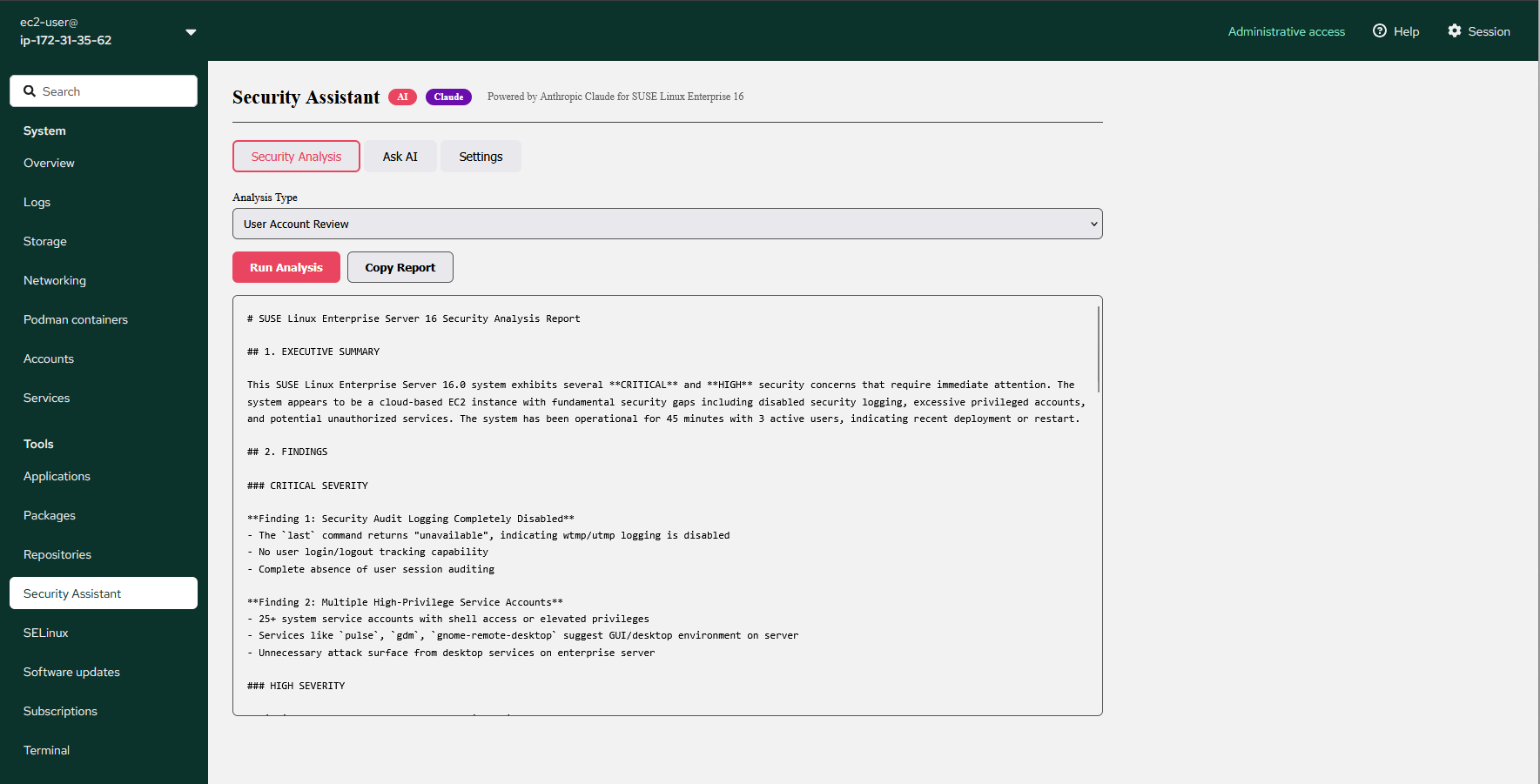
The Security Assistant is a custom Cockpit plugin that collects live system data and sends it to Anthropic Claude for analysis. It covers six analysis types -- Full Security Audit, SSH Configuration Review, Audit Log Analysis, Running Services Review, Network Security Review, and User Account Review. Results are formatted as an Executive Summary, prioritized Findings with severity ratings, numbered Recommendations, and Compliance Notes mapped to PCI-DSS, HIPAA, and NIST. The Ask AI tab lets you ask plain-language security questions about your system and get specific answers with real commands.
The Security Assistant uses your own Anthropic API key. Your key is stored only in your browser and never sent to Madarson IT. Analysis data goes directly from your instance to the Anthropic API.
WHO IS THIS FOR
Security teams and system administrators who want a fast, browser-based way to manage SUSE Linux servers without requiring deep CLI expertise for every task. Organizations that want AI-assisted security analysis without paying for a SaaS security platform. Small and mid-sized businesses running SUSE Linux workloads who need compliance-aware security guidance on demand. Developers and DevOps teams who want a lightweight management console with built-in AI security feedback.
QUICK START
- Launch EC2 instance (t3.medium or larger, 20GB EBS minimum). Open port 9090 in Security Group.
- Connect via SSH using your EC2 key pair and username ec2-user.
- Set an access password for the web console using the passwd command.
- Open a browser and navigate to your instance IP address on port 9090.
- Log in with ec2-user and the password you set.
- Click Security Assistant in the left navigation.
- Go to Settings and enter your Anthropic API key from your Anthropic account.
- Run a Full Security Audit or ask a security question.
ANTHROPIC API KEY
The Security Assistant requires an Anthropic API key for AI analysis. Each analysis call costs a few cents depending on the model selected. Claude Sonnet 4 is recommended for detailed analysis. Claude Haiku 4.5 is available for faster, lower-cost responses. Your key is stored only in your browser session and is never transmitted to or stored by Madarson IT.
Why use Madarson IT SUSE Linux Enterprise Server images?
Madarson IT certified images are always up to date, secure, follow industry standards, and are built to work right out of the box.
Support: For questions, private offers, or additional support needs contact us at info@madarsonit.com
Disclaimer: SUSE and SUSE Linux Enterprise Server are registered trademarks of SUSE LLC. Madarson IT does not provide commercial licenses for SUSE products. Claude is a third-party AI service.
Highlights
Highlighted by the publisher on AWS Marketplace.
Browser-based server management with Cockpit: monitor CPU, memory, disk, and network in real time, manage services, review logs, manage users, configure networking, manage containers, and access a full browser terminal -- no SSH client required.
AI Security Assistant powered by Anthropic Claude: analyze your live system for security risks, SSH hardening, audit log findings, network exposure, and user account issues -- with severity ratings, remediation commands, and PCI-DSS, HIPAA, and NIST compliance observations on demand.
Your key, your data: the Security Assistant uses your own Anthropic API key. No SaaS subscription, no hidden fees, no vendor data retention. All analysis runs on your EC2 instance and goes directly to the AI service using your credentials.
Preview
3 images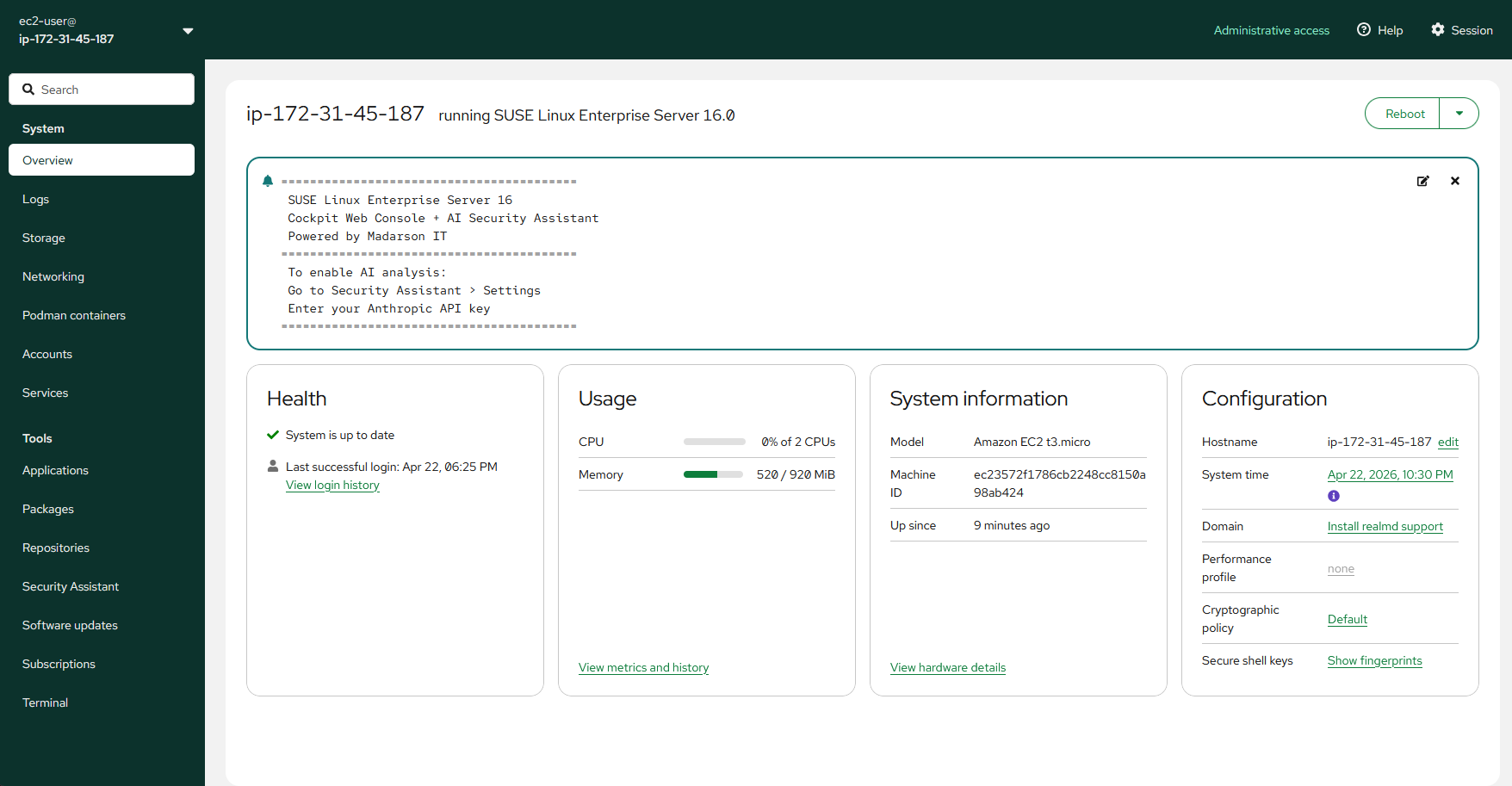
Agent build and provenance
See the full provenance
The layer-by-layer build, the evidence behind each claim, the risk basis and the cross-marketplace links are open to any account. Some rows are disclosed, some the source leaves Unknown; a free account shows you which.
Refund terms
As stated by the publisher on AWS Marketplace.
There is no refund policy for this image.
Sources
Linked repositories
Unknown means this listing does not publish a repository. It is not a statement that the code is closed, and a linked repository is not a claim that the publisher wrote it: the registry computes that relationship privately and does not publish it.
Evidence risk is the share of the build you cannot see before you deploy, not a security rating. Sign in to see the layer-by-layer basis for this band.