
Tech Support Agent AI Powered IT Helpdesk & Support Automa
atQor · Cybersecurity & IT
Certification per Microsoft Marketplace.
Evidence tier Source Confirmed · 9 captures on record
What the publisher says
As described on Microsoft Marketplace.
Tech Support Agent by atQor is an AI-powered IT helpdesk agent built on Microsoft Copilot Studio that enables employees, end users, and IT administrators to get instant technical support, step-by-step troubleshooting guidance, and seamless escalation management — simply by having a conversation.
No ticket portal. No long queues. No technical expertise required. But you can integrate a ticket portal such as Jira or Service Now as well.
Show the rest of the publisher’s description (39 more lines)
HOW IT WORKS: The agent engages users in a natural, human-like conversation, understands their technical issue or IT request, and delivers an accurate resolution instantly. When an issue cannot be resolved automatically, the agent detects escalation triggers and immediately notifies the senior IT team via automated email through Power Automate — all in the background, without any manual intervention.
WHAT YOU CAN DO:
► L1 — Basic IT Support
- Password resets and account unlocks
- MFA setup and troubleshooting
- Microsoft 365 app access issues
- Basic how-to guidance (Outlook, Teams, OneDrive, SharePoint)
- Printer and peripheral setup guidance► L2 — Intermediate Troubleshooting
- Microsoft 365 user and license management
- Outlook and Exchange email issues
- Active Directory user, group, and OU management
- Device connectivity and endpoint troubleshooting
- SharePoint, Teams, and OneDrive configuration issues► L3 — Advanced Technical Support
- Microsoft Intune / Endpoint Manager configuration
- Azure Active Directory (Entra ID) and Conditional Access policies
- Security hardening and compliance guidance
- VPN, DNS, and network connectivity troubleshooting
- Microsoft Purview and DLP policy guidance
- Other Technical solutions also provide► Escalation & Case Management
- Auto-detect escalation triggers (e.g., "urgent", "not working", "escalate", "call me")
- Instantly notify senior IT engineers via automated email
- Offer direct call, Teams meeting booking, or senior engineer follow-up
- Forward unresolved cases to the IT team automaticallyKEY CAPABILITIES:
✔ Conversational AI agent — no technical skills needed ✔ Built on Microsoft Copilot Studio ✔ Adaptive support — L1, L2, L3, and Strategic Advisory ✔ Powered by Power Automate + Microsoft Graph API ✔ Auto-escalation with real-time email notification ✔ Knowledge base integration with IT SOPs and documentation ✔ Guided resolution before any destructive or critical action ✔ Works within your existing Microsoft 365 tenant ✔ Available 24/7 in Microsoft Teams ✔ Multilingual support ✔ Zero manual helpdesk steps for common IT issues ✔ Compliance-ready IT support automation
TECHNOLOGY STACK:
- Microsoft Copilot Studio — Conversational AI agent engine
- Power Automate — Escalation flows and email automation
- Microsoft Graph API — Microsoft 365 user and data management
- SharePoint / Knowledge Base — IT SOPs and documentation search
- Microsoft Teams — Primary end-user interaction channel
- Azure Automation — Background IT task execution (optional)IDEAL FOR:
- IT Helpdesk and Support Teams
- Microsoft 365 Administrators
- End Users and Employees across all departments
- IT Managed Service Providers (MSPs)
- Organizations looking to reduce helpdesk ticket volume
- Enterprises scaling their IT support operationsIT resolutions are delivered within seconds of chat interaction.
Escalations are notified to the IT team within minutes of detection.
For assistance: info@atqor.com
Preview
3 images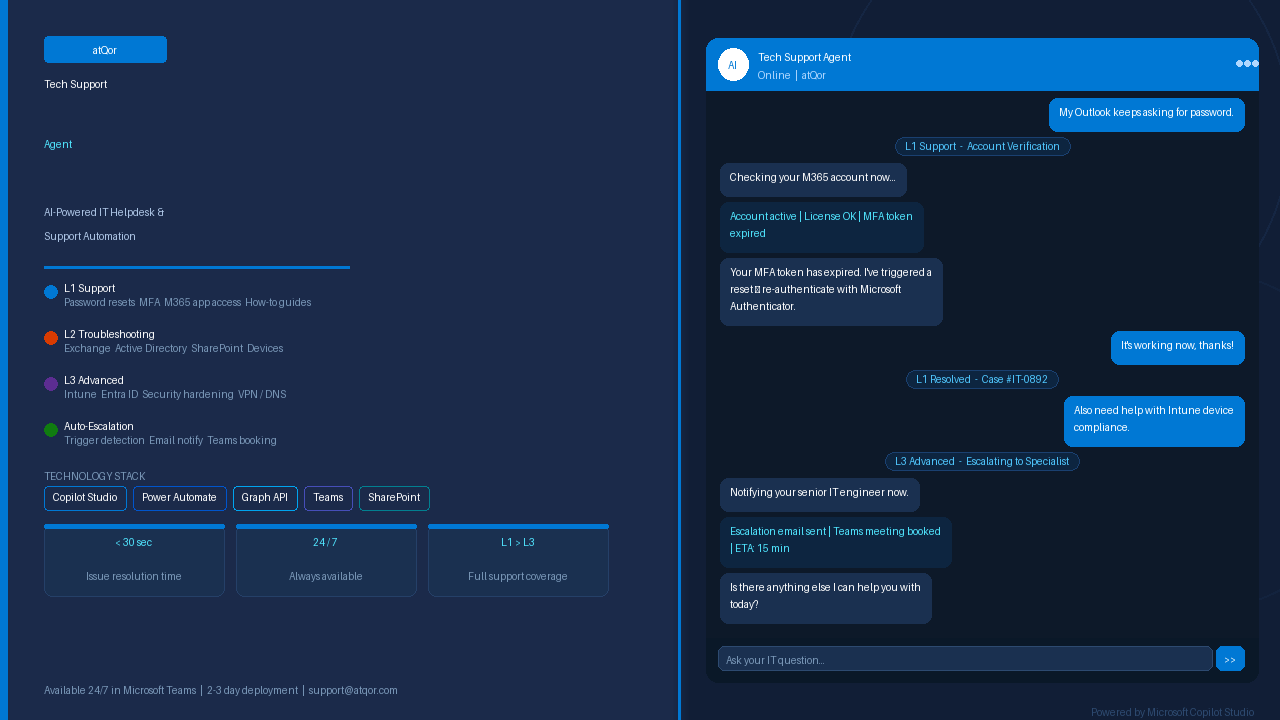
Agent build and provenance
See the full provenance
The layer-by-layer build, the evidence behind each claim, the risk basis and the cross-marketplace links are open to any account. Some rows are disclosed, some the source leaves Unknown; a free account shows you which.
Compliance
- FedRAMPConfirmedNot listed90%, registry-checkedNo FedRAMP Marketplace entry matched this vendor's domain, checked 2026-08-27registry recordas observed 2026-08-27
Confirmed means matched to a public authoritative registry. Claimed means the vendor or its listing states it, not yet cross-checked. A framework not shown was not found in any source we hold, which is not evidence against it. Not listed means a scoped registry check found no match for this vendor's domain: a No is a scoped registry check, not a compliance judgment. Confidence bands: 95% domain-verified, 90% registry-checked, 80% self-attested, 70% weak signal. Self-attested items marked “vendor's site” are gathered from the vendor's own website and are not verified by us.
Vendor
External enrichment · as of 2026-08-29
Sources
Publisher resources
1 linkLinked repositories
Unknown means this listing does not publish a repository. It is not a statement that the code is closed, and a linked repository is not a claim that the publisher wrote it: the registry computes that relationship privately and does not publish it.
Evidence risk is the share of the build you cannot see before you deploy, not a security rating. Sign in to see the layer-by-layer basis for this band.