
Access Request Automation Agent
atQor · Operations & Productivity
Certification per Microsoft Marketplace.
Evidence tier Source Confirmed · 8 captures on record
What the publisher says
As described on Microsoft Marketplace.
Access Request
Automation Agent by atQor is an AI-powered workflow automation agent built on
Show the rest of the publisher’s description (84 more lines)
Microsoft Copilot Studio that enables employees to submit internal access
requests directly from Microsoft Teams using an intuitive Adaptive Card
experience.
No email chains.
No spreadsheets. No manual ticket creation.
HOW IT WORKS:
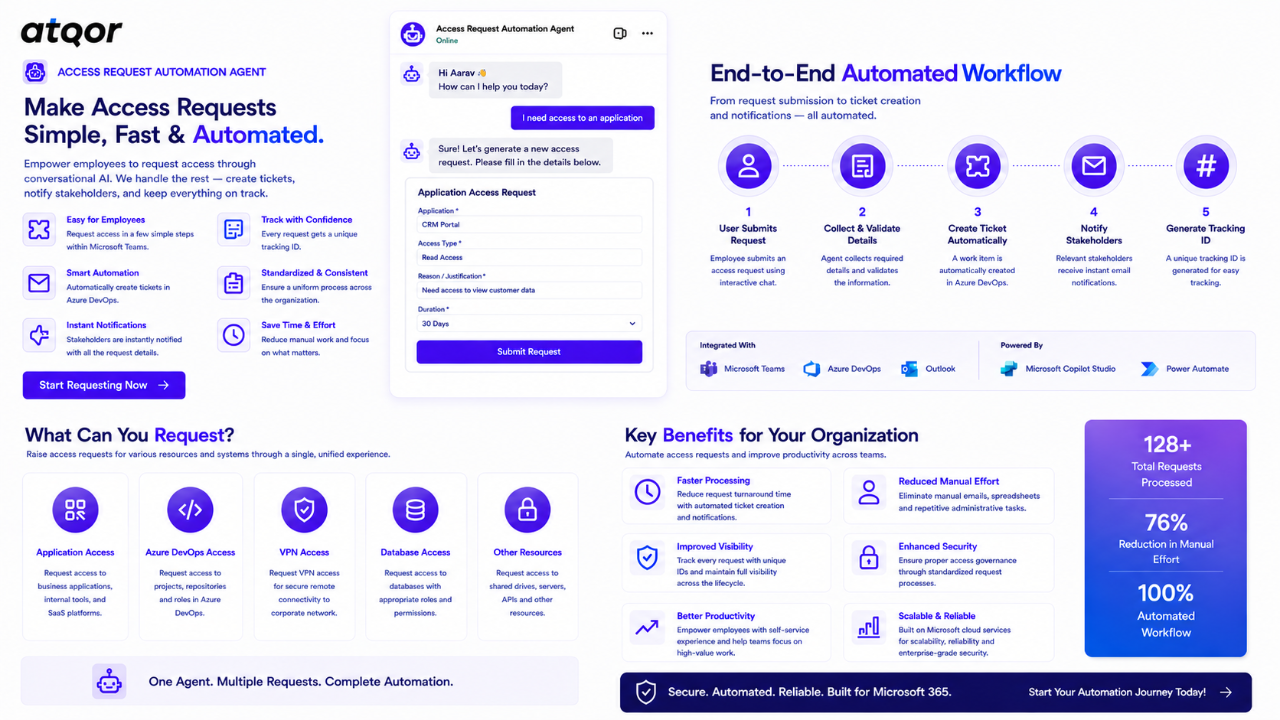
The agent guides
users through a simple access request form, collects all required information,
and automatically creates an Azure DevOps work item while sending email
notifications to the relevant stakeholders.
The entire
process happens within Microsoft Teams, providing employees with a seamless
self-service experience while reducing manual effort for IT and Operations
teams
WHAT YOU CAN
REQUEST:
► Application Access
- Application name
- Requested role
- Access duration
- Business justification
► Azure DevOps Access
- Project access requests
- Reader or Contributor roles
- Temporary or permanent access
► VPN Access
- Remote connectivity requests
- Time-bound access requirements
► Database Access
- Database resource requests
- Role-based access requirements
KEY CAPABILITIES:
✔ Conversational AI agent built on Microsoft Copilot Studio
✔ Interactive Adaptive Card request forms
✔ Automatic Azure DevOps work item creation
✔ Automatic ticket ID generation and tracking
✔ Automated email notifications
✔ Microsoft Teams integration
✔ Standardized access request workflow
✔ Eliminates manual email-based request processes
✔ Reduces repetitive administrative effort
✔ Improves request visibility and accountability
TECHNOLOGY STACK:
- Microsoft
Copilot Studio — Conversational AI Agent
- Microsoft Teams — User Interface
- Adaptive Cards — Interactive Request Forms
- Power Automate — Workflow Automation
- Azure DevOps — Work Item Creation & Tracking
- Microsoft Outlook — Notification Emails
IDEAL FOR:
- IT Operations
Teams
- Infrastructure Teams
- Security Teams
- Project Managers
- Internal Support Teams
- Organizations looking to automate internal access request processes
WHY CHOOSE ACCESS
REQUEST AUTOMATION AGENT:
Native Microsoft
Teams and Copilot Studio integration enables employees to submit requests
without leaving their collaboration platform.
The solution
automates Azure DevOps ticket creation, generates tracking IDs, and sends
notifications automatically, ensuring consistency and reducing manual workload.
By eliminating
emails, spreadsheets, and manual ticket creation, organizations can accelerate
request processing while maintaining a standardized and auditable workflow.
ACCESS REQUEST
AUTOMATION AGENT HELPS ORGANIZATIONS:
- Reduce manual
administrative effort
- Standardize
access request collection
- Improve
visibility into submitted requests
- Create an
auditable request trail
- Accelerate
request submission and processing
- Improve
employee experience through self-service automation
For assistance :info@atqor.com
Preview
2 images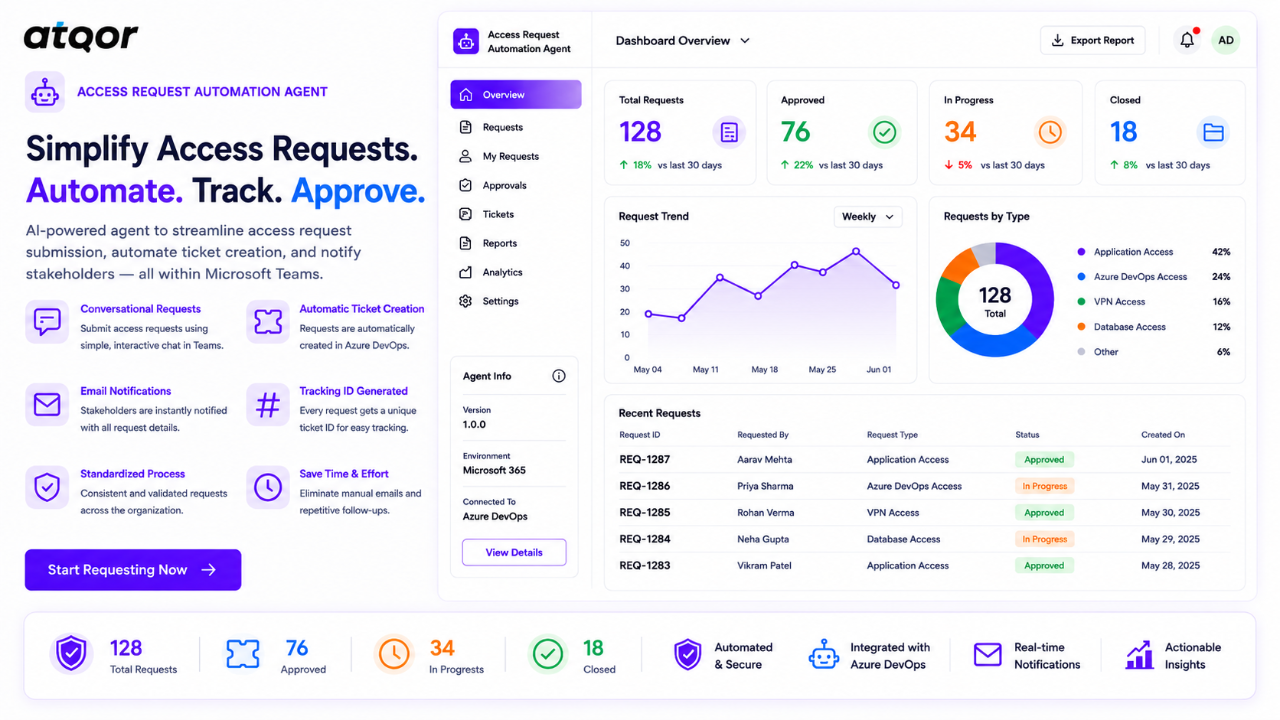
Agent build and provenance
See the full provenance
The layer-by-layer build, the evidence behind each claim, the risk basis and the cross-marketplace links are open to any account. Some rows are disclosed, some the source leaves Unknown; a free account shows you which.
Compliance
- FedRAMPConfirmedNot listed90%, registry-checkedNo FedRAMP Marketplace entry matched this vendor's domain, checked 2026-08-27registry recordas observed 2026-08-27
Confirmed means matched to a public authoritative registry. Claimed means the vendor or its listing states it, not yet cross-checked. A framework not shown was not found in any source we hold, which is not evidence against it. Not listed means a scoped registry check found no match for this vendor's domain: a No is a scoped registry check, not a compliance judgment. Confidence bands: 95% domain-verified, 90% registry-checked, 80% self-attested, 70% weak signal. Self-attested items marked “vendor's site” are gathered from the vendor's own website and are not verified by us.
Vendor
External enrichment · as of 2026-08-29
Sources
Publisher resources
1 linkLinked repositories
Unknown means this listing does not publish a repository. It is not a statement that the code is closed, and a linked repository is not a claim that the publisher wrote it: the registry computes that relationship privately and does not publish it.
Evidence risk is the share of the build you cannot see before you deploy, not a security rating. Sign in to see the layer-by-layer basis for this band.