

Merchant QBR AutoPilot
IntelliThing · Operations & Productivity
Certification per Microsoft Marketplace.
Evidence tier Publisher Attested · 7 captures on record
What the publisher says
As described on Microsoft Marketplace.
Merchant QBR AutoPilot helps account managers and merchant success teams prepare consistent, executive-ready Quarterly Business Reviews inside Microsoft 365.
The app turns merchant performance data into structured scorecards, PowerPoint presentations, performance insights, and reusable QBR workspaces so teams can spend less time formatting and more time on strategy, accountability, and customer outcomes.
Show the rest of the publisher’s description (33 more lines)
What you can do:
- Find and use merchant CSV or TSV files saved in your OneDrive.
- Generate a QBR scorecard for one selected merchant using sample data or a confirmed OneDrive file.
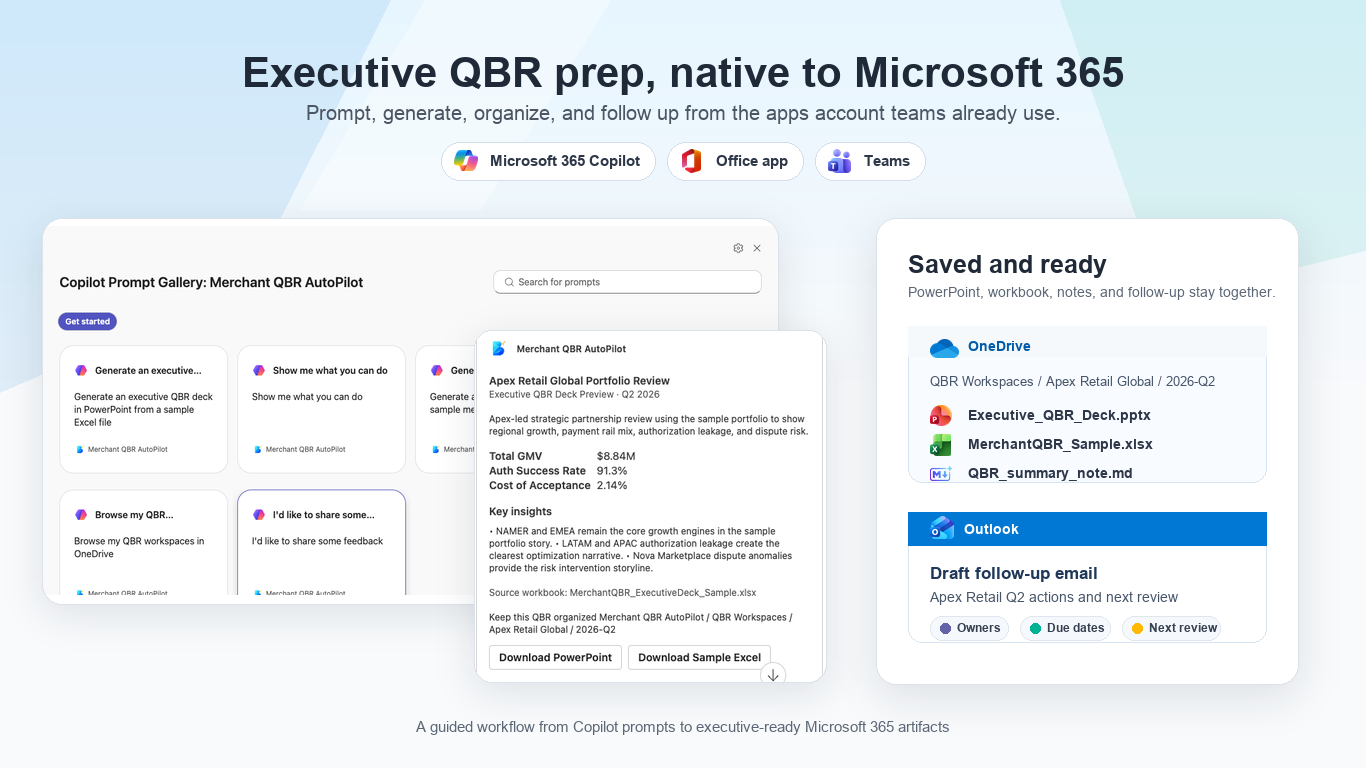
- Create an Executive QBR Deck Preview from a bundled sample Excel workbook.
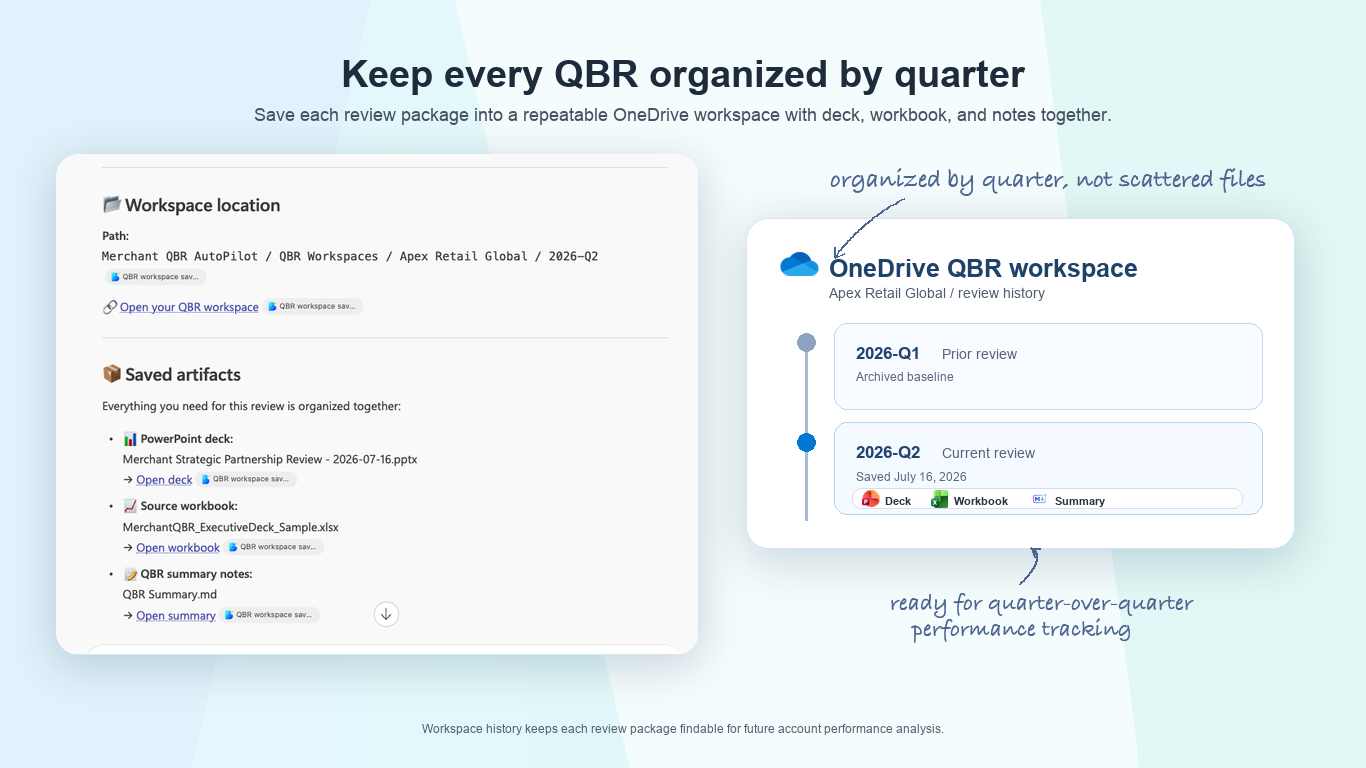
- Save the PowerPoint deck, source workbook, and QBR summary together in an organized OneDrive workspace.
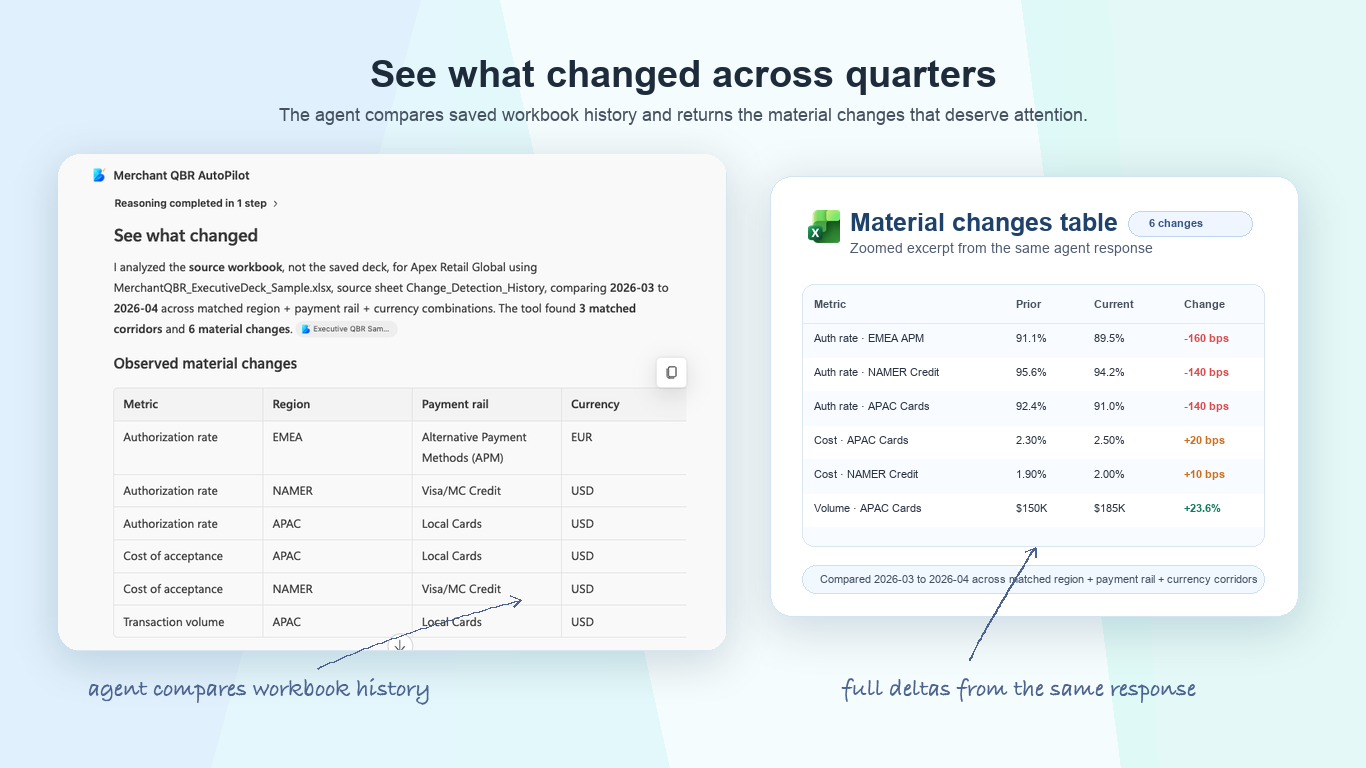
- Compare matched reporting periods and identify material changes in volume, authorization performance, acceptance cost, disputes, and refunds.
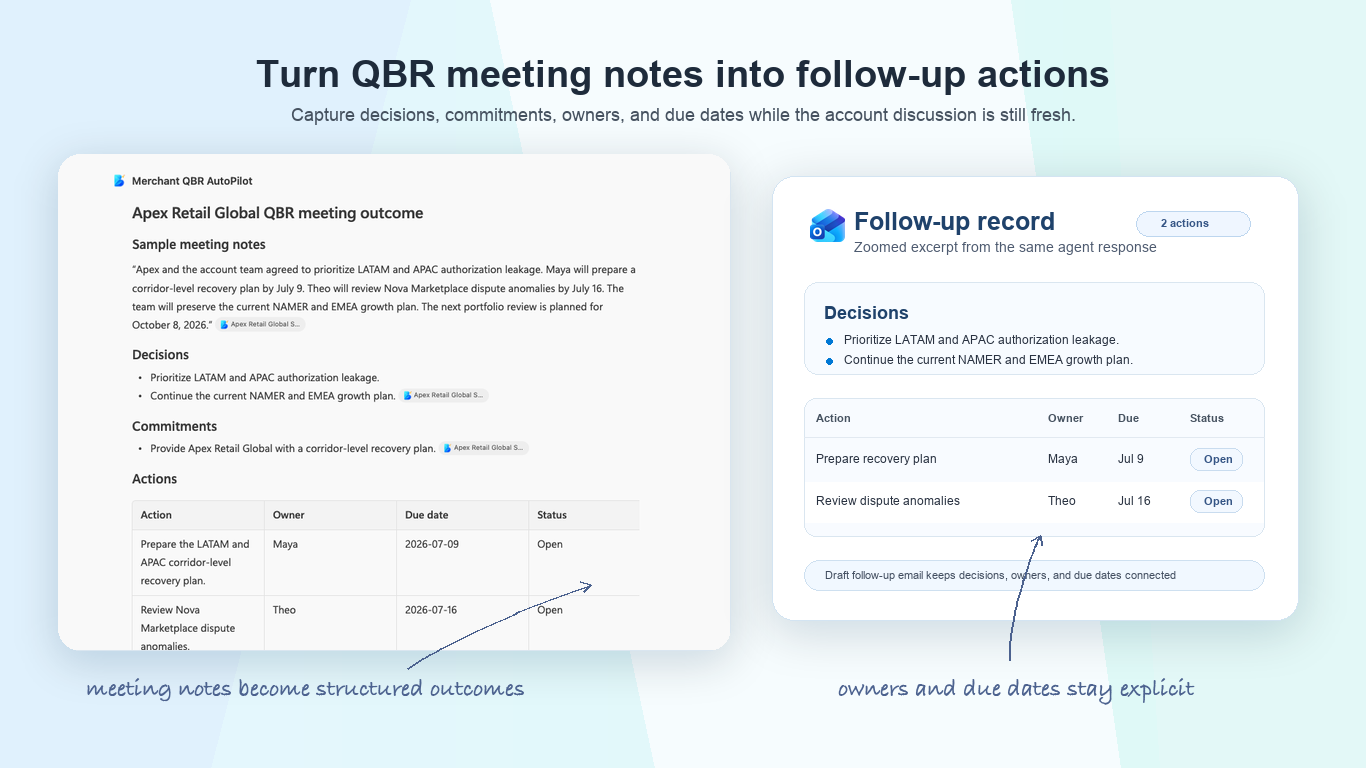
- Turn sample QBR meeting notes into decisions, commitments, actions, owners, due dates, a next-review date, and a draft follow-up email.
- Save the approved meeting outcome as readable Markdown and structured JSON follow-up records.
- Browse previously saved app-owned QBR workspaces in OneDrive.
Designed for recurring QBR workflows:
- Prepare an executive presentation.
- Keep the review materials organized in OneDrive.
- Understand what changed since the prior reporting period.
- Capture the meeting outcome for future follow-up.
Who it is for:
Merchant account managers, customer success managers, partner managers, and business operations teams that run recurring customer and portfolio reviews.
Prerequisites:
An authenticated Microsoft 365 work or school account with OneDrive. No separate account or sign-up is required.
Installation note:
Your organization may require IT administrator approval before the app can be added. If you see "This app requires approval from your IT admin," select Request approval, then ask your IT team to review the request at M365 Admin Center > Agents > All agents > Requests: https://admin.cloud.microsoft/#/agents/all/requested. See the IT admin approval guide: https://www.intellithing.com/m365/it-admin-merchant-qbr-autopilot.html
Permissions and data:
The app uses delegated Microsoft Graph Files.ReadWrite permission on behalf of the signed-in user. This allows it to search and read selected QBR data files in the user's OneDrive and, only after explicit confirmation, create or update QBR workspace artifacts there. The app does not request access to email or calendars, does not request Files.ReadWrite.All, and does not use application-level file permissions. See the privacy policy for data-handling details: https://www.intellithing.com/m365/privacy-merchant-qbr-autopilot.html
Current limitations:
- File search and workspace saving are limited to the signed-in user's OneDrive.
- The app generates one scorecard or one Executive QBR Deck Preview per request.
- Executive QBR Deck Preview, change detection, and meeting follow-up capture use bundled sample content.
- Arbitrary user Excel mapping is not currently supported for Executive QBR Deck Preview.
- Temporary PowerPoint and workbook download links expire.
- Workspace browsing recognizes only the folder structure created by Merchant QBR AutoPilot.
Get Started: https://www.intellithing.com/m365/get-started-merchant-qbr-autopilot.html
Contact Us: https://www.intellithing.com/#contact
Help: https://www.intellithing.com/m365/support-merchant-qbr-autopilot.html
Sign-up: Not applicable. Users authenticate with Microsoft 365.
Preview
5 images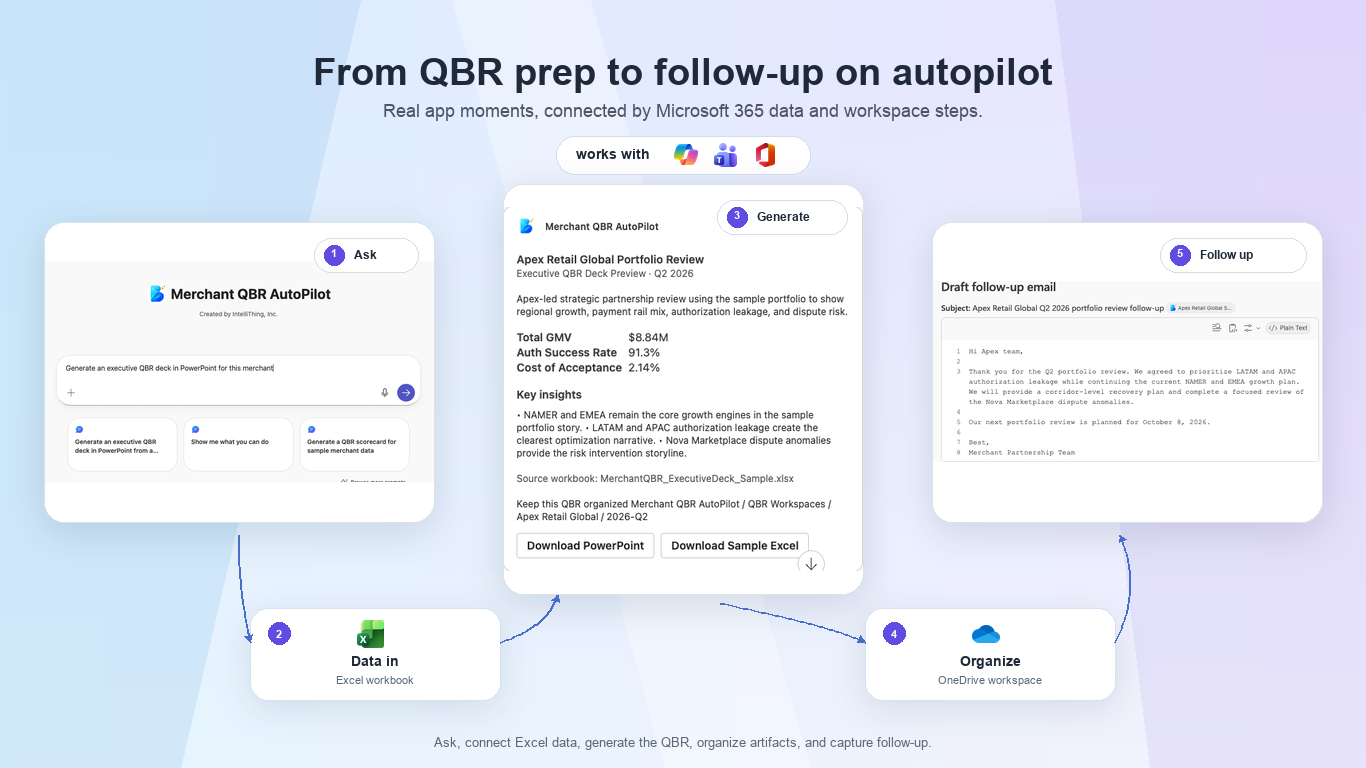
Agent build and provenance
See the full provenance
The layer-by-layer build, the evidence behind each claim, the risk basis and the cross-marketplace links are open to any account. Some rows are disclosed, some the source leaves Unknown; a free account shows you which.
Compliance
- FedRAMPConfirmedNot listed90%, registry-checkedNo FedRAMP Marketplace entry matched this vendor's domain, checked 2026-08-27registry recordas observed 2026-08-27
Confirmed means matched to a public authoritative registry. Claimed means the vendor or its listing states it, not yet cross-checked. A framework not shown was not found in any source we hold, which is not evidence against it. Not listed means a scoped registry check found no match for this vendor's domain: a No is a scoped registry check, not a compliance judgment. Confidence bands: 95% domain-verified, 90% registry-checked, 80% self-attested, 70% weak signal. Self-attested items marked “vendor's site” are gathered from the vendor's own website and are not verified by us.
Vendor
External enrichment
Sources
Publisher resources
2 linksLinked repositories
Unknown means this listing does not publish a repository. It is not a statement that the code is closed, and a linked repository is not a claim that the publisher wrote it: the registry computes that relationship privately and does not publish it.
Evidence risk is the share of the build you cannot see before you deploy, not a security rating. Sign in to see the layer-by-layer basis for this band.