

iPlanner Pro for Teams
iGlobe · Operations & Productivity
Certification per Microsoft Marketplace.
Evidence tier Microsoft 365 Certified · 10 captures on record
What the publisher says
As described on Microsoft Marketplace.
iPlanner Pro for Microsoft Teams.
For better planning and higher productivity. Do you and your team use Microsoft Planner, Microsoft Loop or The New Planner, in your daily work? Then you need the iPlanner Pro!
Show the rest of the publisher’s description (35 more lines)
iPlanner Pro - Extending Microsoft 365 Planner into Outlook and Microsoft Teams. iPlanner Pro lets you securely connect your Microsoft Planner, Teams Task and Loop Tasks with an Add-in for Microsoft Outlook and an App Microsoft Teams.
Our goal is to streamline your daily workflow and that of your team, advancing toward a unified task and work management system that interconnects Microsoft Teams, Outlook, and Planner. Rather than juggling between applications to track your upcoming tasks, you can view everything in one comprehensive display. This unification across Outlook, Planner, and Microsoft Teams facilitates seamless integration and improves the user experience—dismantling communication and application fences to bolster collaborative efforts. Users appreciate tools that are not only practical and visually attractive, but also empowering and manageable across devices and within their most commonly used products. iPlanner Pro is set to amplify business value by augmenting organizational and personal efficiency, simply because it makes doing work and team collaboration straightforward.
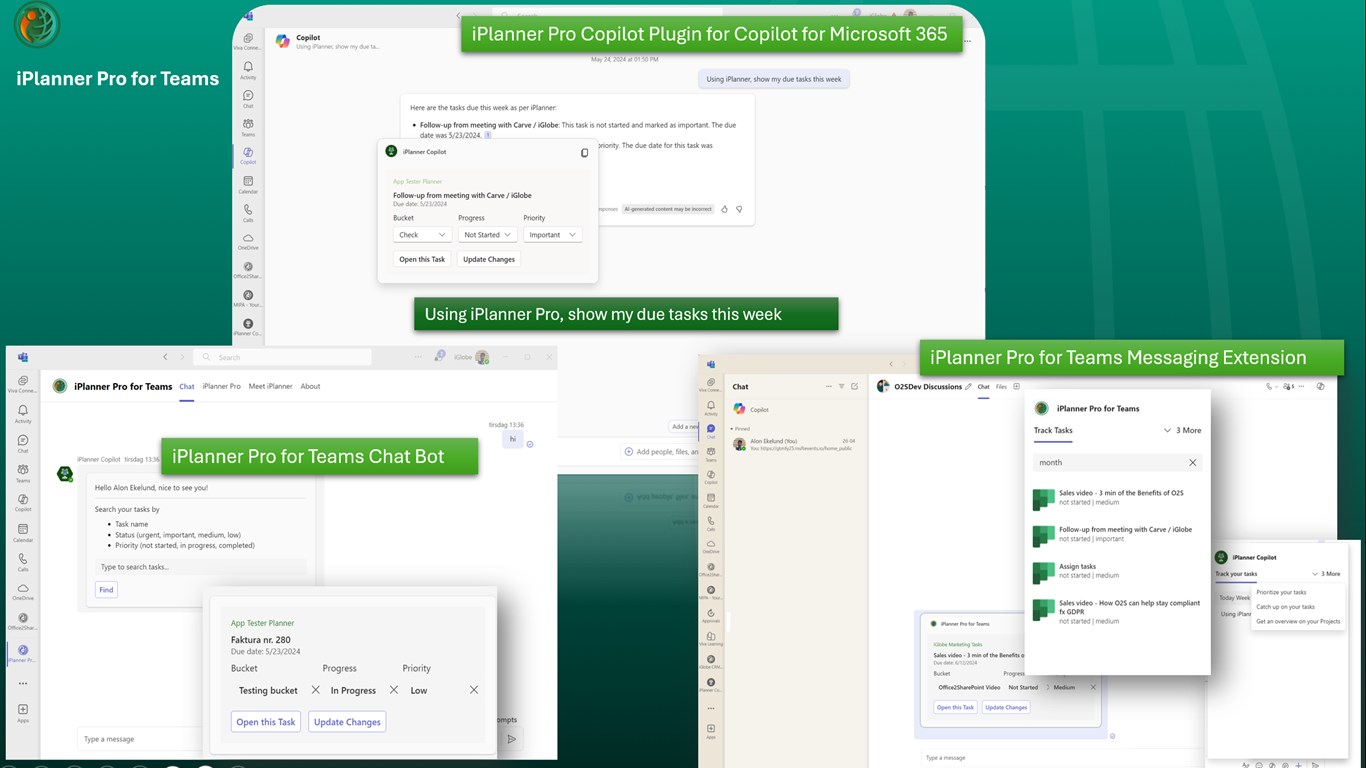
iPlanner Pro is an App family allowing you to easily manage, yours and colleagues Planner Tasks, in Outlook, and Microsoft Teams, with a Personal Microsoft Teams App in Microsoft Teams and extended to Outlook and Microsoft Office, a Bot, Microsoft Teams Messaging extension and Copilot agent. Copilot agent for iPlanner Pro will require a Microsoft 365 Copilot.
All under the same iPlanner Pro subscription.
iPlanner Pro for Outlook
iPlanner Pro for Teams
This App is iPlanner Pro for Teams
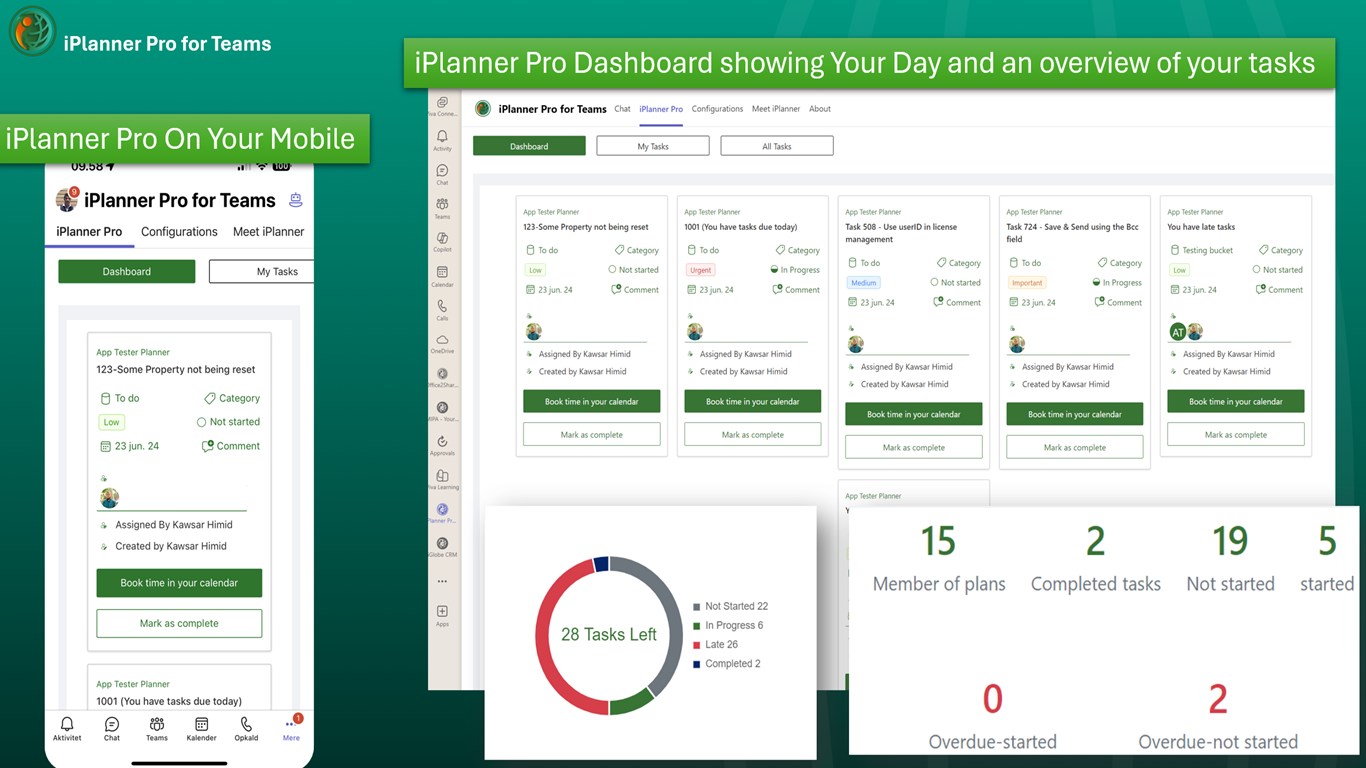
Personal productivity
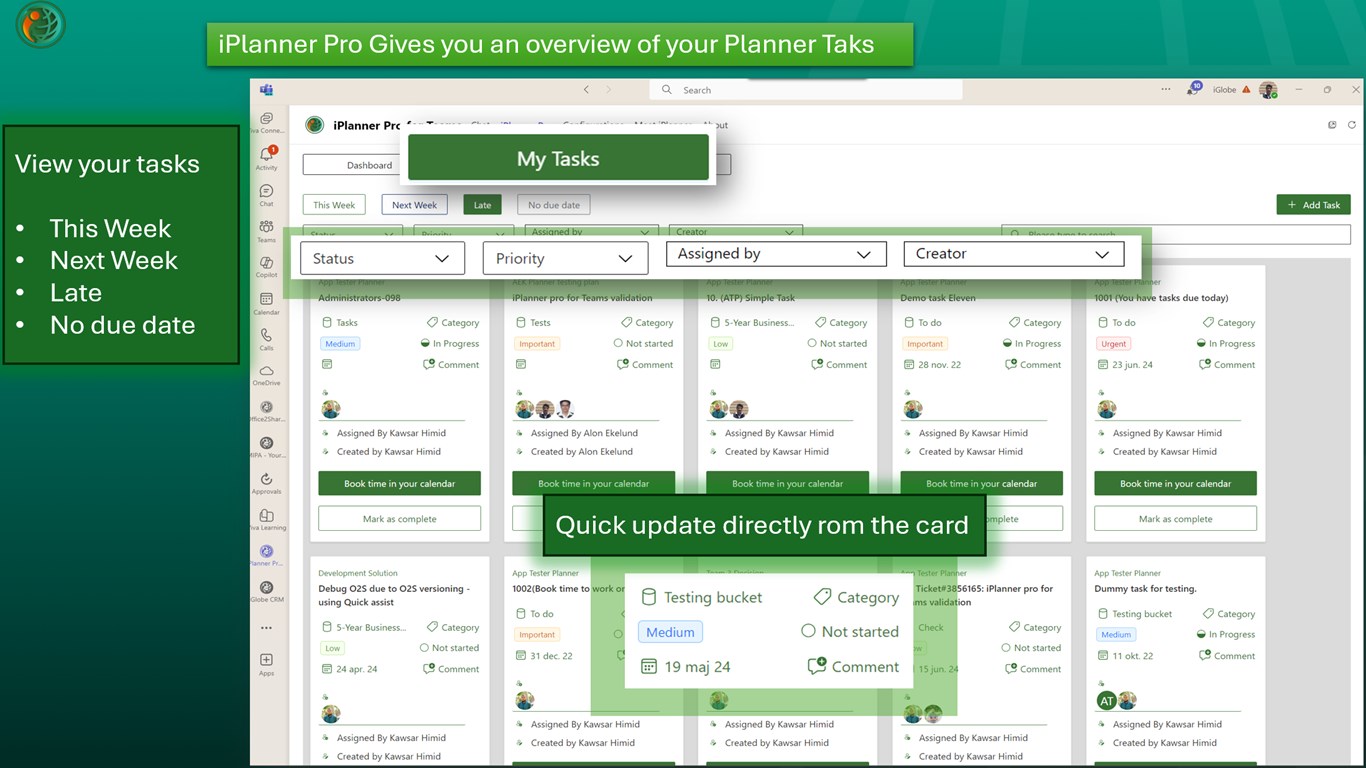
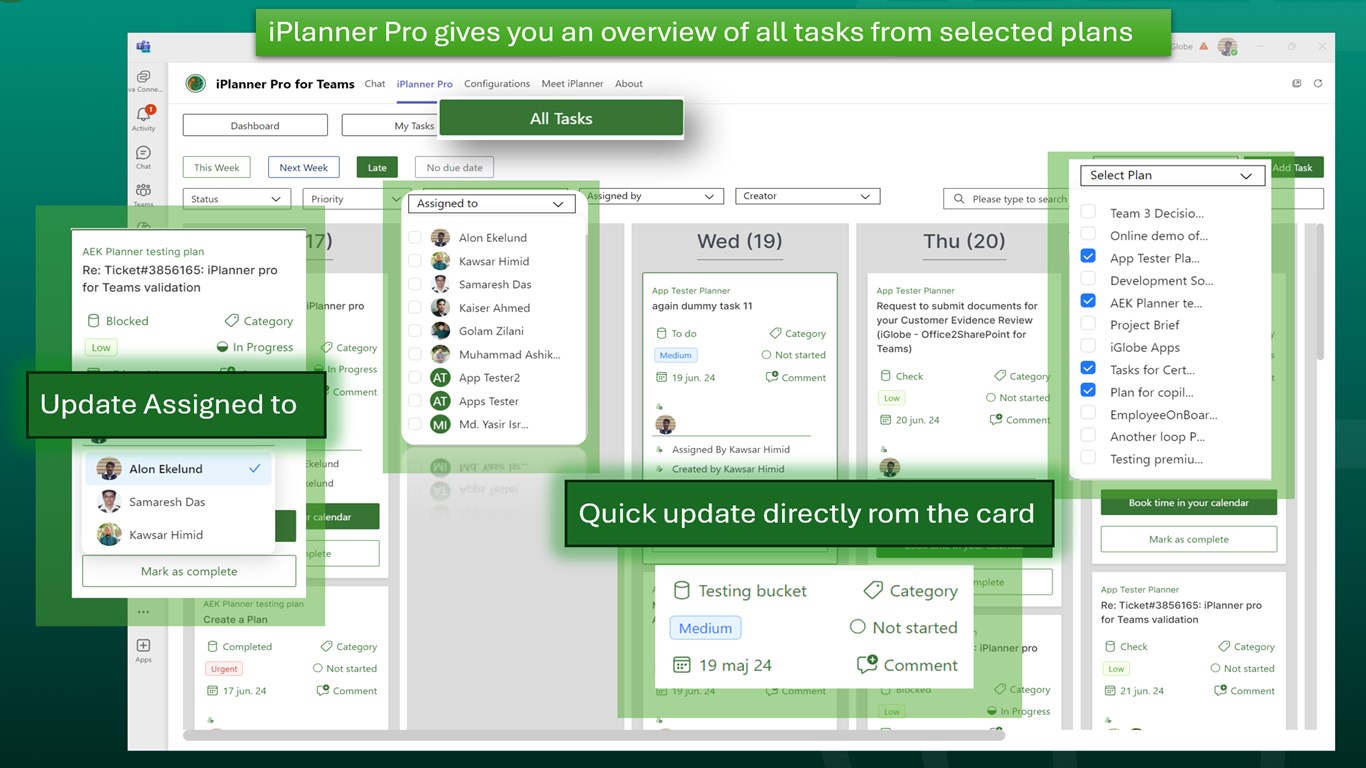
Automatically captures all your activities from Microsoft Planner, giving you accurate and detailed imidiate overview of your tasks.
Team productivity
Gain a deep understanding of your team's productivity patterns, identify areas for improvement, and optimize your workflow for maximum efficiency. Make data-driven decisions and propel your business forward with confidence.
Giving you some features Microsoft Planner is missing
Register time on tasks
Configuring iPlanner Pro Time log feature will allow you to register time spent on tasks. Using Power BI, you will be able to visualize how your organization is spending time on different tasks. Contact iGlobe support for assistance.
For better resource planning
A Scheduler view to prioritize tasks and manage your team's workload, boosting productivity and streamlining project management. A timeline view (GANTT) to visualize project timelines and ensure smooth collaboration.
For our Copilot for Microsoft 365 user.
Using Prompts in Microsoft 365 Copilot you will have a Copilot agent at your side making sure you are always on track with yours or your colleagues’ tasks.
“Track your tasks”
"Using iPlanner Pro, show me my due tasks of the [Period] ", - Period offer the following choices (Today, Week, Month)
“Prioritize your tasks”
"Using iPlanner Pro, show me my open tasks by [Priority], categorized by status ",
“Catch up on your tasks”
"Using iPlanner Pro, show me my overdue tasks by [Priority]", - Priority offer the following choices (All, Urgent, Important, Medium, Low)
Important requirement for using iPlanner Pro for Teams
- The organizational Microsoft 365 Global administrator must have secure iPlanner Pro by giving Admin consent.
- You must have an Office 365 subscription.
- You must be signed into your Microsoft 365 account to use iPlanner Pro
- For using Copilot agent for iPlanner Pro you must have a Microsoft 365 Copilot
- Before a user can create a new task in a Microsoft Plan from iPlanner Pro the user must be a member of the Plan and at least one task must be assigned to the user.
- The user must have used Microsoft Planner and must be member of at least one Microsoft Planner Plan.
Please feel free to contact aek@iglobe.dk for information about the iPlanner Pro
Support:
Should you have any questions please feel free to contact us. We can also offer you a demo or assist you in the implementation. As it is a simple product, we believe it will not take more than just 30 min. Book us now
Please consider joining our Yammer community to get the latest updates. I will email you an invitation from Yammer directly. This is where we share service status, news and updates, ideas, questions to us or other customers. If any of your colleagues also want to join, please ask them to email sales@iglobe.dk with their email and I will invite them.
Preview
5 images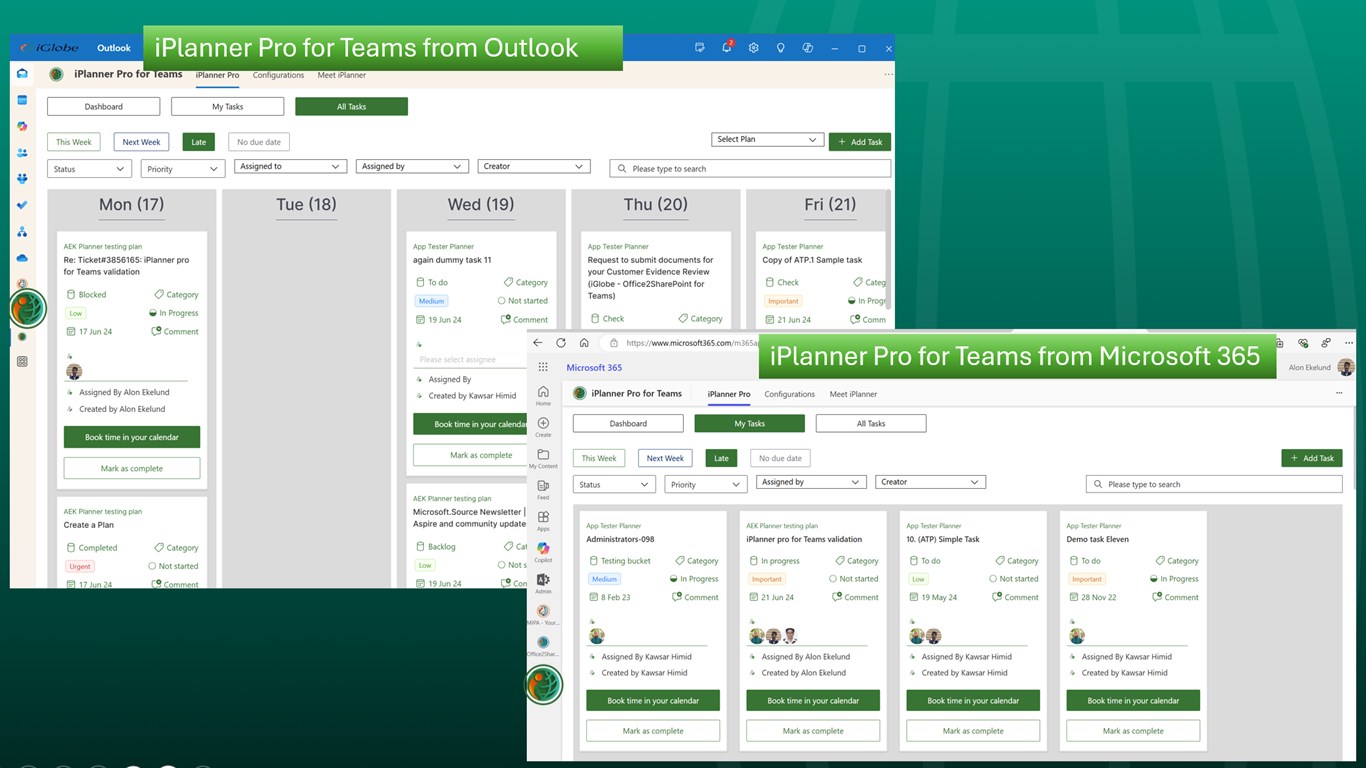
Agent build and provenance
See the full provenance
The layer-by-layer build, the evidence behind each claim, the risk basis and the cross-marketplace links are open to any account. Some rows are disclosed, some the source leaves Unknown; a free account shows you which.
Compliance
- FedRAMPConfirmedNot listed90%, registry-checkedNo FedRAMP Marketplace entry matched this vendor's domain, checked 2026-08-27the vendor self-attests this, but it is not in the registryregistry recordas observed 2026-08-27
- ISO/IEC 27001Claimed80%, self-attestedself-attested on the marketplaceas observed 2026-08-25
- ISO/IEC 27002Claimed80%, self-attestedself-attested on the marketplaceas observed 2026-08-25
- ISO/IEC 27017Claimed80%, self-attestedself-attested on the marketplaceas observed 2026-08-25
- SOC 2Claimed80%, self-attestedself-attested on the marketplaceas observed 2026-08-25
- SOC 3Claimed80%, self-attestedself-attested on the marketplaceas observed 2026-08-25
- GDPRClaimed80%, self-attestedself-attested on the marketplaceas observed 2026-08-15
- ISO/IEC 27018Claimed80%, self-attestedself-attested on the marketplaceas observed 2026-08-25
- HIPAAClaimed80%, self-attestedself-attested on the marketplaceas observed 2026-08-25
- HITRUST CSFClaimed80%, self-attestedself-attested on the marketplaceas observed 2026-08-25
- PCI DSSClaimed80%, self-attestedself-attested on the marketplaceas observed 2026-08-25
- SOC 1Claimed80%, self-attestedself-attested on the marketplaceas observed 2026-08-25
Confirmed means matched to a public authoritative registry. Claimed means the vendor or its listing states it, not yet cross-checked. A framework not shown was not found in any source we hold, which is not evidence against it. Not listed means a scoped registry check found no match for this vendor's domain: a No is a scoped registry check, not a compliance judgment. Confidence bands: 95% domain-verified, 90% registry-checked, 80% self-attested, 70% weak signal. Self-attested items marked “vendor's site” are gathered from the vendor's own website and are not verified by us.
Sources
Publisher resources
2 linksLinked repositories
Unknown means this listing does not publish a repository. It is not a statement that the code is closed, and a linked repository is not a claim that the publisher wrote it: the registry computes that relationship privately and does not publish it.
Evidence risk is the share of the build you cannot see before you deploy, not a security rating. Sign in to see the layer-by-layer basis for this band.