

ABC Classification Manager
GMSOFT LIMITED · Logistics & Supply Chain
Certification per Microsoft Marketplace.
Evidence tier Source Confirmed · 8 captures on record
What the publisher says
As described on Microsoft Marketplace.
ABC Inventory Optimizer - AppSource Extended Description
Version: 1.1.0.0
Show the rest of the publisher’s description (58 more lines)
Publisher: GMSOFT LIMITED
Overview
ABC Inventory Optimizer brings enterprise-grade inventory classification to Microsoft Dynamics 365 Business Central. Transform your inventory management with sophisticated ABC analysis combined with advanced analytics, helping you reduce inventory costs by 25-30% while improving service levels through data-driven insights.
What is ABC Inventory Optimization?
ABC Analysis is a proven inventory management technique that categorizes items based on their value contribution:
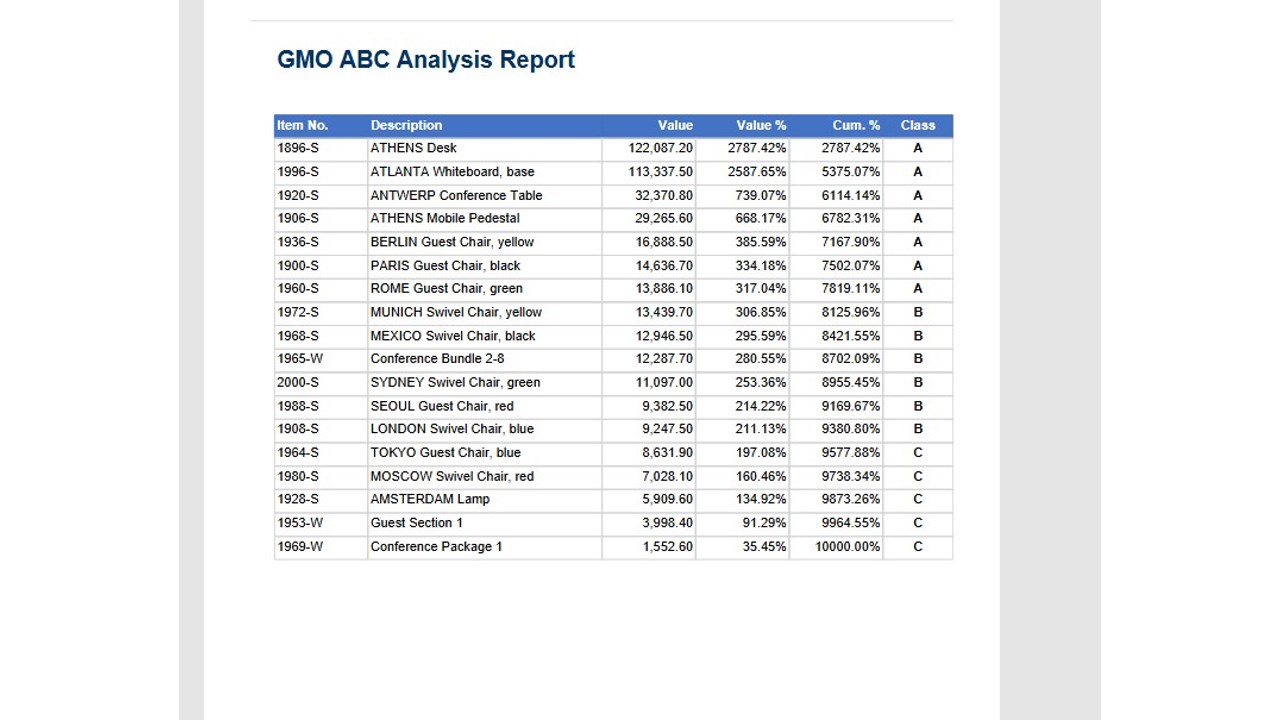
- Class A Items (Top 20%): High-value items contributing 80% of total value - require tight control and frequent review
- Class B Items (Next 30%): Medium-value items contributing 15% of total value - moderate controls
- Class C Items (Remaining 50%): Low-value items contributing 5% of total value - basic controlsBy focusing management attention where it matters most, businesses achieve optimal inventory investment while maintaining service levels.
Key Features
📊 Multiple Classification Models
Analyze inventory from six critical perspectives:
- Revenue Model: Classify by sales contribution
- Gross Profit Model: Focus on profit, not just revenue
- COGS Model: Manage by cost impact
- Usage Value Model: Quantity × unit cost analysis
- GMROII Model: Return on inventory investment
- Pick Frequency Model: Optimize warehouse layout
Run all six models simultaneously to get comprehensive insights into inventory performance from different business angles.
🎯 Flexible Configuration
- Customizable Thresholds: Set your own A/B/C breakpoints (default: 80%/95%)
- Adjustable Time Periods: Analyze any date range (default: 365 days)
- Model-Specific Settings: Different periods and thresholds per model
- Easy Setup Wizard: Get started in minutes with sensible defaults📈 Interactive Worksheet
Preview classifications before committing changes:
- Calculate ABC classifications on-demand
- Review item-by-item breakdown with cumulative percentages
- Visual indicators (🟢 A, 🟡 B, 🔴 C) for instant recognition
- Apply changes only when satisfied with results📜 Complete History Tracking
Never lose sight of classification changes:
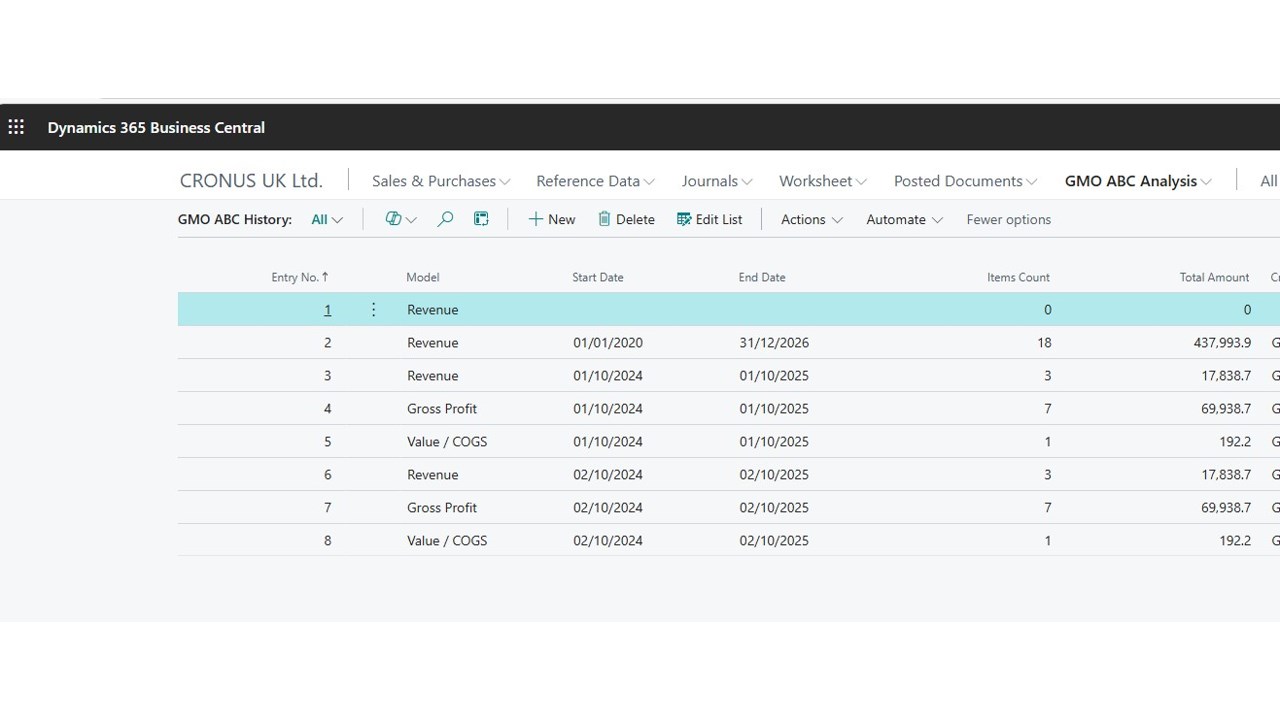
- Automatic history capture on every calculation
- Track when classifications changed and who made the change
- View historical snapshots to analyze trends
- Compare classifications across different time periods🔄 Automated Cycle Counting Integration
Link ABC classifications to physical inventory counting:
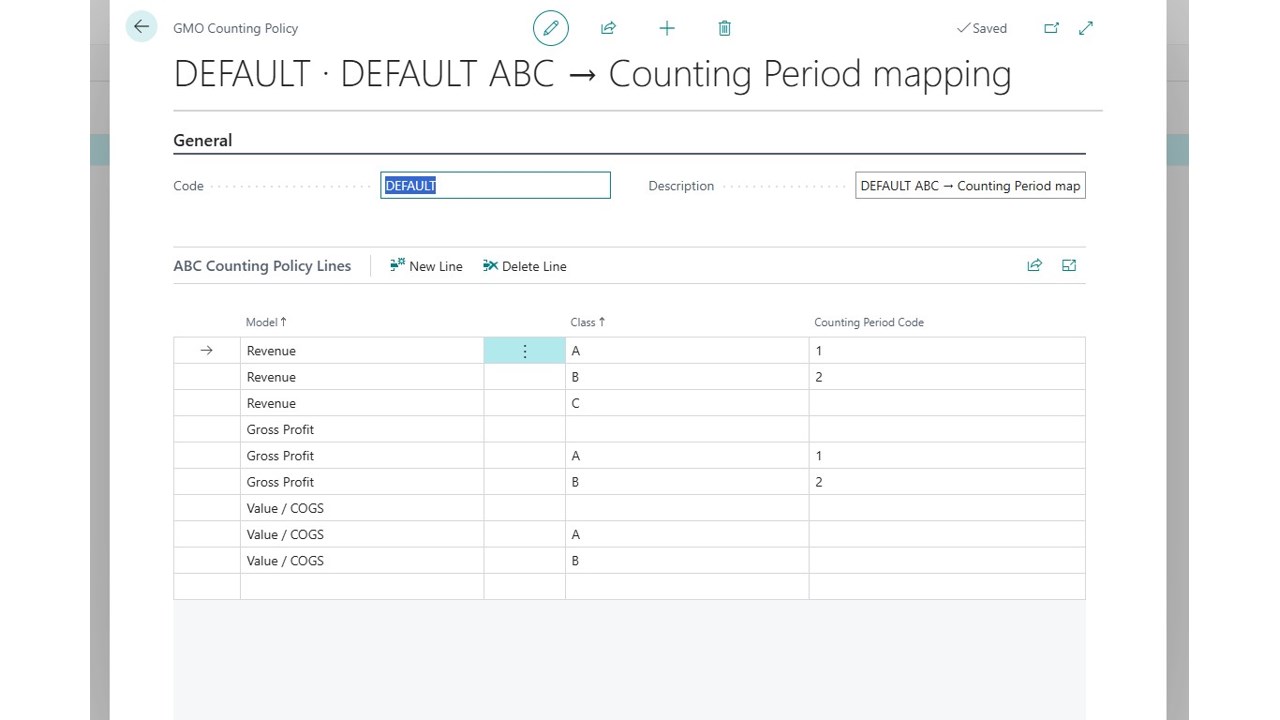
- Define counting policies by ABC class (e.g., A items monthly, C items annually)
- Automatic assignment of counting period codes
- Supports both Item and Stock Keeping Unit (SKU) levels
- Reduce counting effort while improving accuracy where it matters📑 Comprehensive Reporting Suite
Six professional reports included:
- ABC Analysis Report - Detailed breakdown with percentages and values
- Distribution Report - Visual distribution across ABC classes
- Movement Report - Track items moving between classes over time
- Detail by Class Report - Filtered deep-dive by specific class
- Exceptions Report - Identify classification anomalies
- Multi-Model Comparison - Compare Revenue vs. Profit vs. COGS classifications side-by-side🌍 Multi-Language Support
Fully translated and supported in:
- English (en-US)
- Greek (el-GR)
- Italian (it-IT)
- German (de-DE)
- Dutch (nl-NL)
- French (fr-FR)⚡ Seamless Integration
Works natively within Business Central:
- Extends Item Card and Item List pages with ABC fields
- Extends Stock Keeping Unit (SKU) pages
- Integrated into Warehouse Role Center
- No external systems or data exports required
- All data remains secure within your Business Central environment
Preview
4 images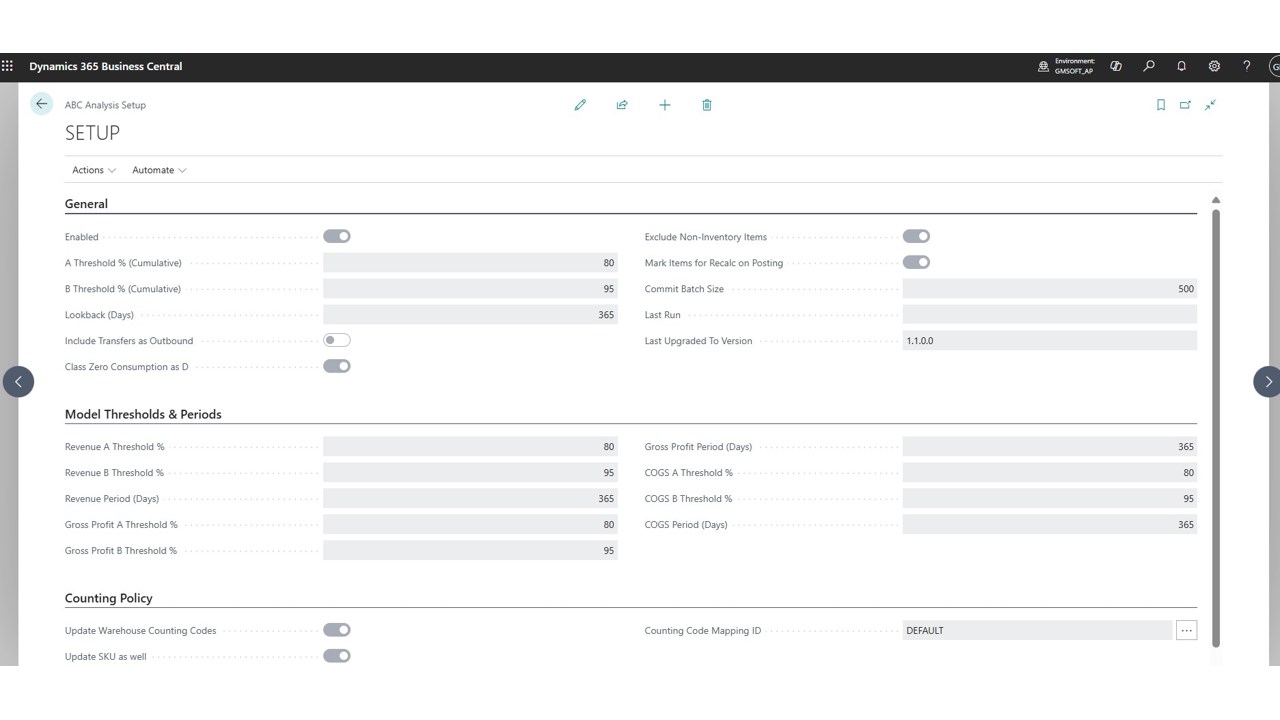
Agent build and provenance
See the full provenance
The layer-by-layer build, the evidence behind each claim, the risk basis and the cross-marketplace links are open to any account. Some rows are disclosed, some the source leaves Unknown; a free account shows you which.
Compliance
- FedRAMPConfirmedNot listed90%, registry-checkedNo FedRAMP Marketplace entry matched this vendor's domain, checked 2026-08-27registry recordas observed 2026-08-27
Confirmed means matched to a public authoritative registry. Claimed means the vendor or its listing states it, not yet cross-checked. A framework not shown was not found in any source we hold, which is not evidence against it. Not listed means a scoped registry check found no match for this vendor's domain: a No is a scoped registry check, not a compliance judgment. Confidence bands: 95% domain-verified, 90% registry-checked, 80% self-attested, 70% weak signal. Self-attested items marked “vendor's site” are gathered from the vendor's own website and are not verified by us.
Sources
Publisher resources
2 linksLinked repositories
Unknown means this listing does not publish a repository. It is not a statement that the code is closed, and a linked repository is not a claim that the publisher wrote it: the registry computes that relationship privately and does not publish it.
Evidence risk is the share of the build you cannot see before you deploy, not a security rating. Sign in to see the layer-by-layer basis for this band.