

Evo-Soft Palletways
Evo-Soft Ireland Ltd · Marketing & Sales
Certification per Microsoft Marketplace.
Evidence tier Source Confirmed · 6 captures on record
What the publisher says
As described on Microsoft Marketplace.
Palletways Integration for Microsoft Dynamics 365 Business Central streamlines pallet distribution by enabling businesses to create Palletways shipments, retrieve available delivery services, generate shipping labels, and manage pallet deliveries directly from within Business Central. By eliminating manual data entry between systems, the extension improves shipping accuracy, increases warehouse efficiency, and simplifies pallet freight management.
Key Features
Show the rest of the publisher’s description (56 more lines)
Seamless Palletways Integration
Connect Microsoft Dynamics 365 Business Central with the Palletways network to manage pallet shipments directly from your ERP system.
Automated Shipment Creation
Create Palletways consignments directly from Warehouse Shipments and Sales Orders, ensuring shipment information is transferred accurately without manual rekeying.
Shipping Label Generation
Generate and print Palletways shipping labels directly from Business Central after submitting shipments, allowing warehouse teams to dispatch pallets quickly and efficiently.
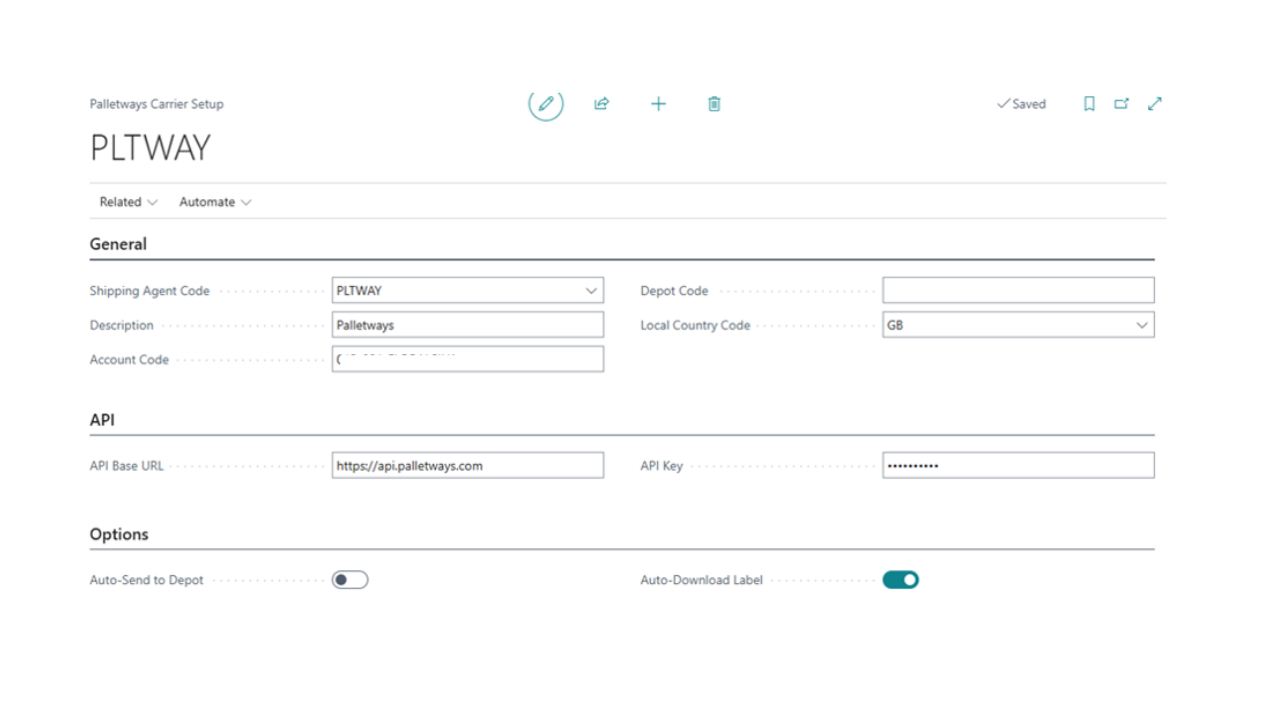
Flexible Carrier Configuration
Configure the Palletways integration through an intuitive setup page, including:
- API connection and authentication settings.
- Depot and account configuration.
- Local country settings.
- Automatic label download after shipment submission.Shipping Agent Setup
Maintain Palletways shipping agent information, including:
- Shipping Agent Code and Description.
- Carrier Integration Type.
- Default shipping settings.
- Package tracking information.Pallet Type & Bill Unit Management
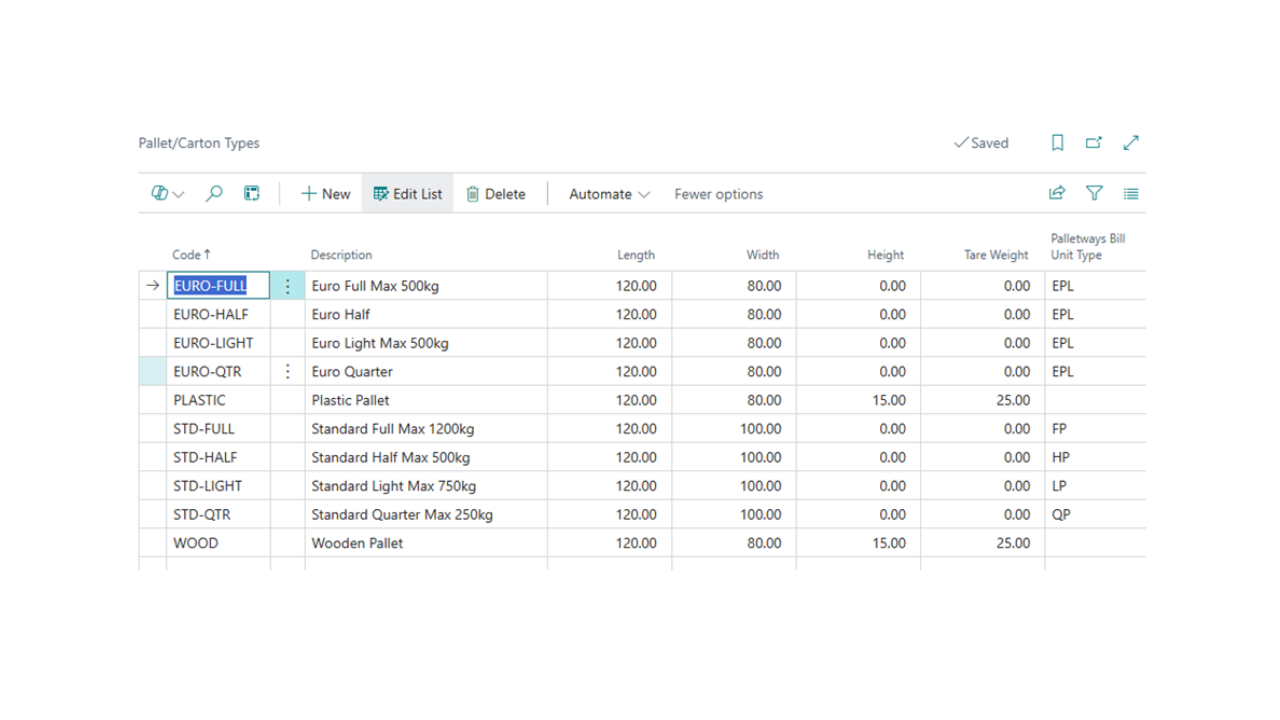
Configure default pallet types, including dimensions and weight, and map them directly to Palletways Bill Unit Types. This ensures the correct pallet specifications are automatically applied during shipment creation.
Dynamic Service Selection
Retrieve available Palletways delivery services based on the customer's Ship-to address, allowing users to select the most appropriate service without leaving Business Central.
Optional Delivery Services
Configure additional Palletways shipment options directly on the Warehouse Shipment, including:
- Tail lift collection and delivery.
- Timed delivery services.
- Residential delivery.
- Book-in requests.
- Consignment notifications.
- Other carrier-specific delivery options.Import Broker Information
Capture and maintain Import Broker details on the Customer Card, including customs and VAT information, broker contact details, and supporting customs documentation for international shipments.
Shipment Processing
Manage the complete shipment lifecycle directly from the Warehouse Shipment page, including:
- Submit Shipment.
- Generate Label.
- Print Label.
- Update Shipment Status.
- Cancel Shipment.
- Create Manifest.
- Order Collection (where applicable).How It Works
- Configure the Palletways Carrier Setup and Shipping Agent settings.
- Define pallet types and map them to the appropriate Palletways Bill Unit Types.
- Maintain customer Import Broker information for international shipments where required.
- Create and process a Sales Order in Business Central.
- Generate the corresponding Warehouse Shipment.
- Retrieve available Palletways services based on the delivery address.
- Select optional delivery services and pallet specifications.
- Submit the shipment directly to Palletways.
- Automatically generate and print Palletways shipping labels and manifests.Benefits
- Eliminate manual entry between Business Central and Palletways.
- Improve shipment accuracy through automated data transfer.
- Reduce warehouse processing time with integrated shipment creation.
- Automatically retrieve available carrier services based on destination.
- Configure pallet specifications once and reuse them across shipments.
- Support international shipments with Import Broker information.
- Generate compliant shipping labels and manifests directly from Business Central.
- Manage the complete pallet shipping process within a single system.Designed For
Palletways Integration is designed for organisations that use Palletways for pallet distribution and want a fully integrated shipping solution within Microsoft Dynamics 365 Business Central. The extension is ideal for manufacturers, distributors, wholesalers, and logistics providers seeking to automate pallet shipment processing while maintaining accurate carrier data, service selection, and shipping documentation.
Preview
3 images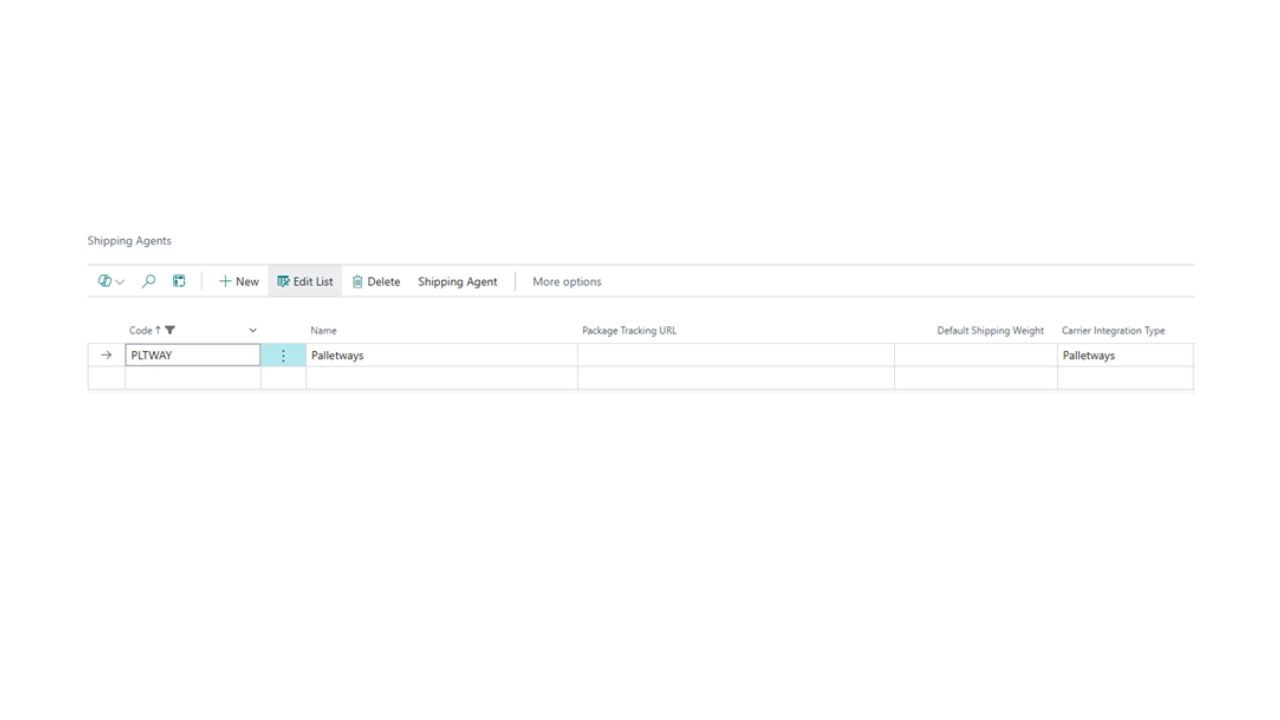
Agent build and provenance
See the full provenance
The layer-by-layer build, the evidence behind each claim, the risk basis and the cross-marketplace links are open to any account. Some rows are disclosed, some the source leaves Unknown; a free account shows you which.
Compliance
- FedRAMPConfirmedNot listed90%, registry-checkedNo FedRAMP Marketplace entry matched this vendor's domain, checked 2026-08-27registry recordas observed 2026-08-27
Confirmed means matched to a public authoritative registry. Claimed means the vendor or its listing states it, not yet cross-checked. A framework not shown was not found in any source we hold, which is not evidence against it. Not listed means a scoped registry check found no match for this vendor's domain: a No is a scoped registry check, not a compliance judgment. Confidence bands: 95% domain-verified, 90% registry-checked, 80% self-attested, 70% weak signal. Self-attested items marked “vendor's site” are gathered from the vendor's own website and are not verified by us.
Vendor
External enrichment
Sources
Publisher resources
3 linksLinked repositories
Unknown means this listing does not publish a repository. It is not a statement that the code is closed, and a linked repository is not a claim that the publisher wrote it: the registry computes that relationship privately and does not publish it.
Evidence risk is the share of the build you cannot see before you deploy, not a security rating. Sign in to see the layer-by-layer basis for this band.